What voice fingerprint is
Voice fingerprint is how you teach the AI to write in your voice, not the default AI voice. It's the single biggest lever on output quality across every sanctioned drafting surface in the app.
The pipeline: the AI reads roughly 8,000 words of your existing prose — pulled from your manuscript documents in Write plus any manuscript-kind uploads in your Vault — and distills a profile of how you write. It captures your sentence rhythm, your vocabulary, your distinctive habits, the things you conspicuously avoid, and a set of illustrative example passages. That profile then gets injected into the system prompt of a specific set of AI surfaces, so their output sounds like you rather than like everyone else.
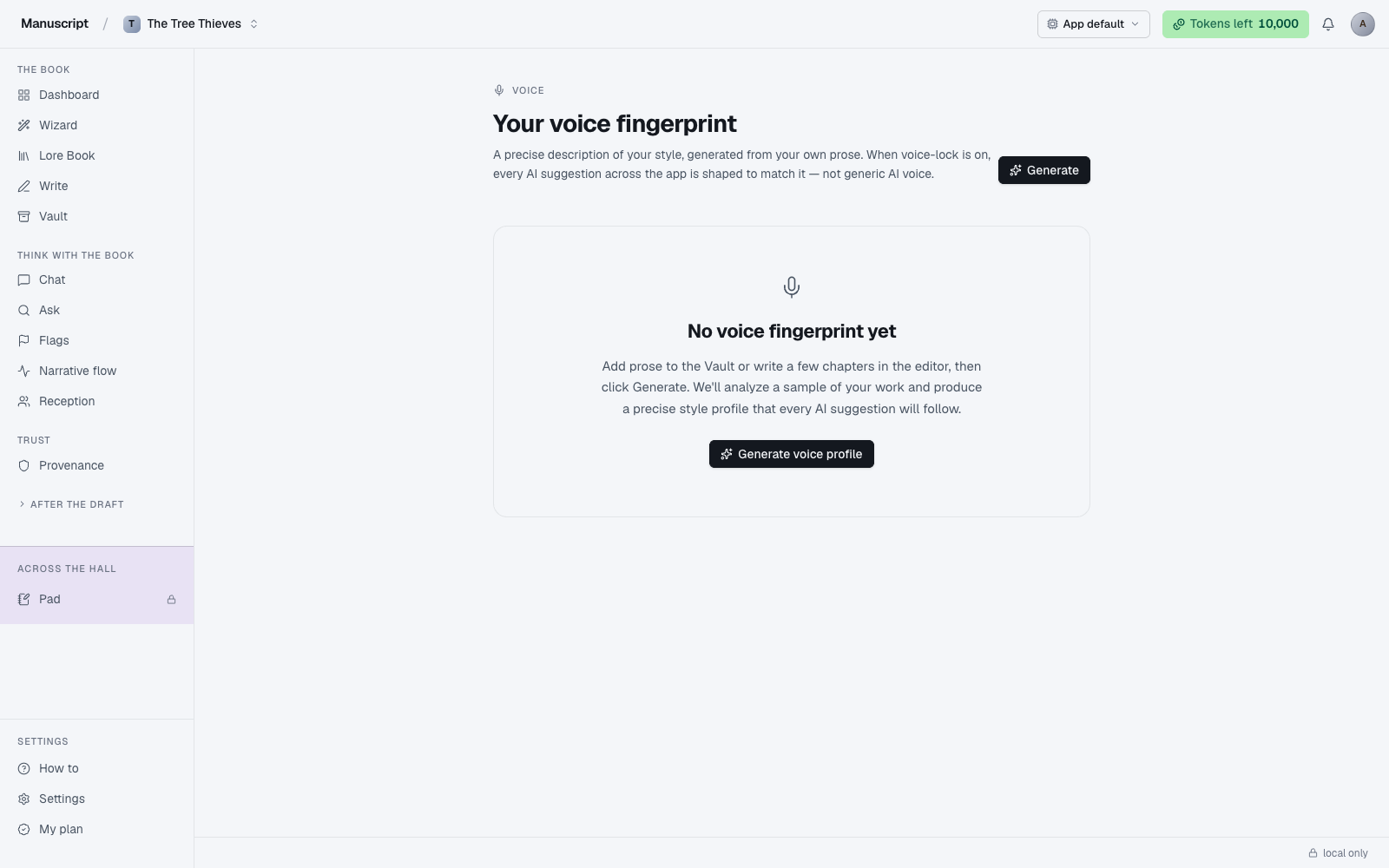
The page eyebrow reads "Voice"; the header reads "Your voice fingerprint"; the subtitle spells out the mechanic ("A precise description of your style, generated from your own prose. When voice-lock is on, every AI suggestion across the app is shaped to match it — not generic AI voice."). Below the header sits either the status card and profile view (if you've already generated one) or an empty-state card with a Generate voice profile button (if you haven't).
The difference between voice-on and voice-off is not subtle. Voice-off, AI-generated prose tends toward lyrical, adjective-heavy, over-metaphored writing — the default AI voice you've read a thousand times. Voice-on, output picks up your specific rhythm, your specific vocabulary, and — often more importantly — the things you don't do. Fragmentary if you write fragmentary. Plain if you write plain. Comma-heavy if you're comma-heavy. Verified live during development: a trained profile produced spare, elliptical prose matching the author's actual style; the same prompt voice-off produced generic lyrical AI prose with the exact elaborate metaphors the profile said to avoid.
Generating a fingerprint
Open the Voice page and click Generate voice profile (or Generate in the top-right if you already have a profile and want to redo it). The button reads "Analyzing your prose…" with a spinner while the pipeline runs. Expect 1 to 3 minutes: the AI pulls up to ~8,000 words from your manuscript documents and manuscript-kind Vault files, sends them through a strict JSON schema, and stores the result in the voice_profiles table (one active profile per user × project).
Pick your input carefully. The generator reads whatever prose it can find in the current project — that's the sample it will imitate. If your manuscript is 30,000 words in, the fingerprint reads mostly from your manuscript, which is what you want. If it's only 5,000 words in and the rest of the sample comes from a research note or an early outline, the profile will imitate the research note. Upload a completed short story or a chapter of your prior published work to the Vault as manuscript-kind first, then generate. The more of your prose the pipeline has to read, the sharper the profile.
Do not include research material or notes as input. The fingerprint should read your voice, not your sources. If the AI reads a page of Wikipedia-style historical notes alongside your prose, it will average them into a blander profile than your own writing warrants. Manuscript-kind uploads only.
Generation runs against a strict schema — the AI has to fill in specific fields (summary, sentence_rhythm, vocabulary, distinctive_habits, avoid, examples). If the input corpus is too thin or too research-heavy the pipeline may return a 400 error with a "add prose first" message pointing you at the Vault or Write. That's an information error, not a bug — add more of your prose and try again.
What the profile looks like
Once generated, the profile renders below the status card in six sections. Read every section. If the AI captured a habit you don't actually have, or missed something you know is central to your voice, regenerate after adding more source material — it's the fix for most "the profile is wrong" complaints.
- Summary — one paragraph describing your voice in the AI's own words
- Sentence rhythm — how you build sentences (short and clipped? long and comma-heavy? mixed with a pattern?)
- Vocabulary — words and phrases you reach for repeatedly, and the register you write in (colloquial, formal, technical, plain)
- Distinctive habits — specific moves you make that most writers don't (opening with weather, using ellipses at scene breaks, one-word paragraphs, whatever)
- Conspicuously avoided — things the AI should NOT do in your voice (no elaborate metaphors, no exclamation marks, no adverbs, whatever the profile detected as absences in your writing)
- Voice examples — passages of yours the AI pulled as illustrative
The "Conspicuously avoided" list is often the most useful section to read. It's the profile telling you what your writing does not do — and it's usually more accurate than the "distinctive habits" list, because absences are easier for the AI to detect than presences.
Where voice is injected
Voice fingerprint is injected into these four surfaces when it's active (profile generated + toggle on):
- Write inline AI commands — all 12 BubbleMenu commands (Paraphrase, Rewrite, Continue, Shorten, Lengthen, Sharpen, and so on)
- Templates — all 40 templates in the Author Pack and Marketing pack
- Desk — query letter, synopsis, blurb, newsletter
- Atomize / Echoes — every channel
Every one of those surfaces takes your voice profile as a --- PROJECT CONTEXT --- block that's prepended to its normal system prompt before the LLM call. The model is instructed to match your voice exactly, not to invent new style traits. That's why generating a fingerprint pays off across every subsequent AI call — one-time work, permanent benefit.
Where voice is NOT injected
Three surfaces deliberately skip voice injection. Each has a specific reason:
- Brainstorm Pad — voice injection here would undermine the wall. The Pad is the room where AI output isn't supposed to be usable in your manuscript. Adopting your voice would make its output more tempting to lift out, which is exactly what the wall exists to prevent.
- Flags — Flags should be observational, not stylized. Reading your book in your voice would bias what it flags (an AI writing in your voice will unconsciously excuse choices that another voice would flag as issues). Neutral is the right register for diagnosis.
- Chat — Chat is for thinking, not writing. Injecting your voice would push it toward being a co-writer that produces drop-in prose, which it isn't. Chat is a co-thinker; drop-in prose belongs in the drafting surfaces.
The pattern: voice injection happens where you're producing sanctioned output (drafts, suggestions, promo). It doesn't happen where you're auditing, exploring, or reasoning about the work.
The toggle
The status card at the top of the Voice page shows one of two states with a matching pill-shaped toggle on the right:
- Voice-lock is ON (with a green check icon) — profile is active. Every applicable surface uses it.
- Voice-lock is OFF (with a gray X icon) — no injection anywhere, even if a profile exists. Useful if you want to hear the default AI voice for comparison, or if the current profile isn't producing what you want and you're deciding whether to regenerate.
Beneath the state indicator, the card also shows the generation timestamp, the word count of the source corpus ("8,247 words"), and how many documents were read ("6 documents"). That metadata is your quick answer to "when did I last update this?" and "is the sample big enough?"
Click the toggle to flip it. The change is instant — the next AI call on any voice-aware surface will use the new state. Toggling off doesn't delete the profile; toggling back on resumes injection using the same profile as before.
When to regenerate
Regenerate the fingerprint when your voice — or the material available for the AI to learn from — has changed enough that the current profile no longer matches. Common triggers:
- You've added a substantial amount of new prose to your manuscript since the last generation (say, 10,000+ words). The profile is reading a snapshot; regenerate to refresh what it's snapshotting.
- You've meaningfully shifted your voice partway through drafting — a POV change, a tense change, a new narrator, a tonal pivot after a major revision.
- The current profile is producing output that doesn't feel like you. Trust the reading test over the profile text. If Desk drafts sound generic, try regenerating even if the profile "looks fine" on the page.
- You've added new manuscript-kind uploads to the Vault that better represent your current writing (a completed novella, a published essay, a stronger chapter).
Regeneration replaces the current active profile. There's no history of past profiles — the current one is the current one, and the previous one is gone. If you want to A/B test two voice profiles against each other, generate one, note the output on a canonical prompt, regenerate, and compare — but understand you can't roll back.
Verified live
Voice fingerprint has been verified end-to-end. On the sample manuscript included with the app (a 235-word slice with a distinctive spare/elliptical voice), voice-on produced fragmentary prose matching the trained profile — the actual source motifs used, the actual rhythm preserved. Voice-off produced generic AI-lyrical prose full of the exact elaborate metaphors the profile said to avoid.
If you've generated a profile and your output still sounds generic, the most common cause is that the profile didn't have enough of your prose to read from — regenerate with more manuscript-kind material in the Vault. The second-most-common cause is that the toggle is off. Check both.
When something goes wrong
- The generated profile is thin. The pipeline didn't have enough of your prose to read. Upload more of your prior published prose to the Vault as manuscript-kind and regenerate. If your manuscript is under 5,000 words, the profile will lean on Vault content — make sure the Vault is representative.
- Output on Templates or Desk still sounds generic. Check the toggle first — the profile may exist but the switch may be off. Flip it on and rerun.
- My voice sample and the AI's captured summary disagree. Regenerate. The AI may have over-weighted a stretch of your prose that isn't representative (a dialogue-heavy chapter reading as your "distinctive habit" when actually you're mostly narration). More source material dilutes stretch-based bias.
- I turned the toggle off and my Provenance percentage changed. It didn't — voice affects the style of AI suggestions, never whether an accepted suggestion is logged as AI-authored. The percentage math is voice-agnostic; every accepted suggestion counts the same regardless of what voice it was in.
How to use it
- Navigate to
/voice(there's no direct sidebar entry — go via URL or from a link in another surface). The page loads with the eyebrow Voice, the header Your voice fingerprint, and either an empty state (if you haven't generated one) or your active profile below. - If it's your first time, you'll see the No voice fingerprint yet card with a description and a Generate voice profile button. Make sure you have prose to analyze first — add manuscript-kind uploads to the Vault or write a few chapters in Write. Research material or notes should NOT be included; the fingerprint should read your voice, not your sources.
- Click Generate voice profile (or Generate in the top-right if you're on an existing profile page). The button reads "Analyzing your prose…" with a spinner. Expect 1–3 minutes: the AI pulls up to ~8,000 words from your manuscript documents and manuscript-kind Vault files, then distills the profile through a strict schema.
- When it finishes, the page renders your profile below the status card in six sections: Summary, Sentence rhythm, Vocabulary, Distinctive habits, Conspicuously avoided, and Voice examples. Read every section — if the AI captured a habit you don't actually have or missed something central, click Regenerate in the top-right after adding more source material.
- Check the status card at the top. It shows "Voice-lock is ON" or "Voice-lock is OFF" along with the generation timestamp, source word count, and document count. To the right is a pill-shaped toggle.
- Click the toggle to flip voice-lock. When ON, the profile is injected into the system prompt of every voice-aware surface — the 12 inline editor commands in Write, all templates in Templates, all four kinds of Desk drafts, and every channel in Atomize. When OFF, no injection anywhere, even if a profile exists.
- Regenerate whenever your voice shifts substantially or when output stops feeling like you. Regeneration replaces the current active profile — there's no history of past profiles.
What to read next
- Write — the primary surface where voice injection matters
- Desk — where voice injection matters most for agent-facing writing
- Provenance — voice injection changes the style of AI suggestions, but every accepted suggestion is still logged as AI-authored