What this guide is
Manuscripts.ai is a writing workspace built around one rule: the AI never writes your prose unless you ask it to. This guide walks you through every surface — from your first signup to the day you export a finished manuscript with a full provenance ledger stapled to it.
The guide is written to be re-read. If you're trying to remember exactly how a Deep Analysis credit gets refunded, or which surfaces use your voice fingerprint, you should be able to find that answer in a single paragraph and move on.
What the app is, in 30 seconds
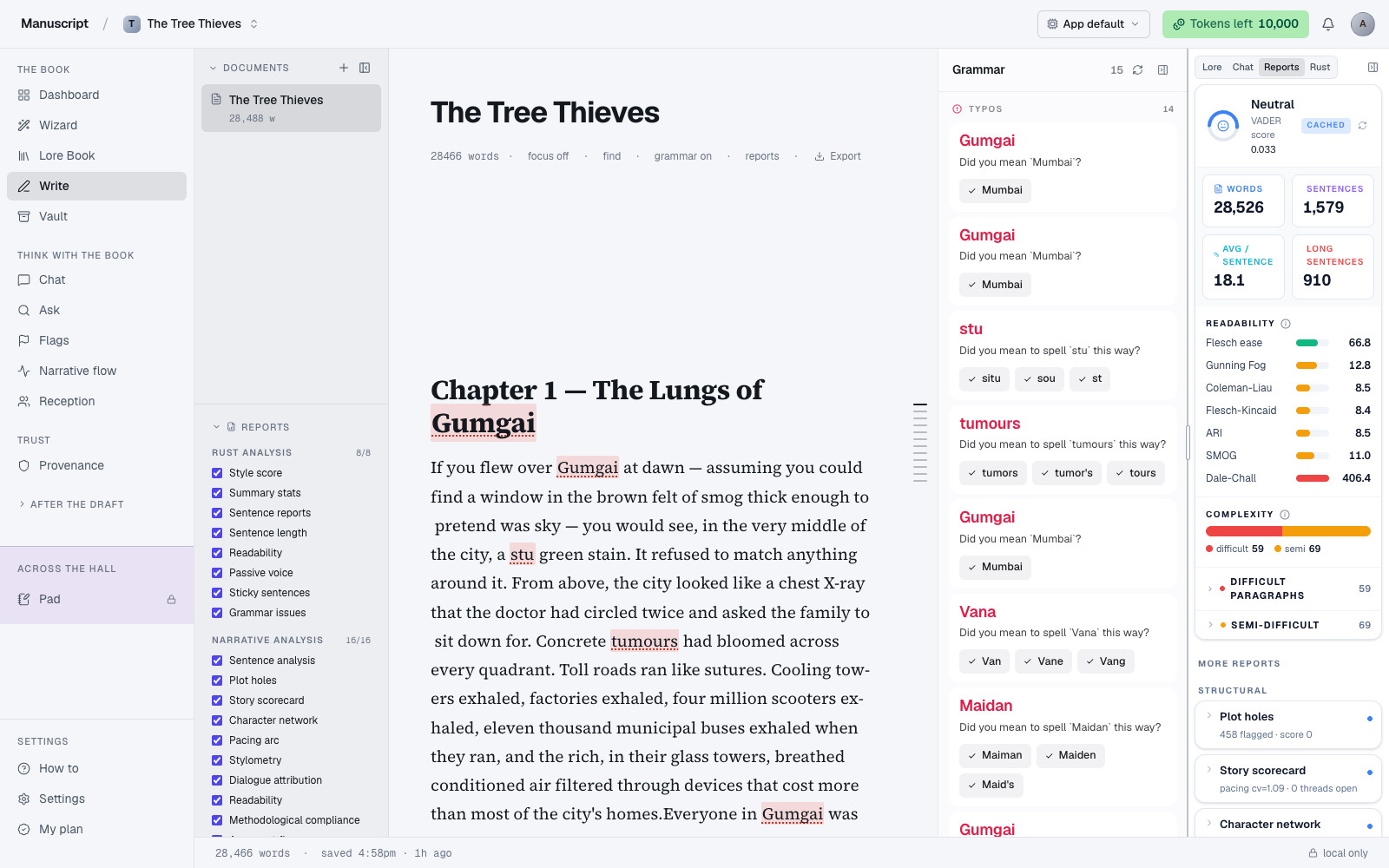
- Write — a serif long-form editor with inline AI commands you invoke on selection. Nothing gets in without an Accept button.
- The Wizard — a 10-step interview that turns an idea into a seeded manuscript, lore book, and outline. Optional first-draft chapters at the end.
- Lore Book and Outline — the story graph: characters, locations, objects, and the Acts → Chapters → Scenes structure.
- Chat, Ask, Flags, Narrative Flow — think, search, catch contradictions, see pacing.
- Deep Analysis — the paid deep-cut simulation. 100 fictional readers, five simulated days, one $55 credit.
- Provenance — the ledger. Every AI-accepted word logged with before/after text.
- Voice fingerprint — teaches AI to write in your voice, injected into four surfaces.
- Templates, Desk, Atomize — after-the-draft production: craft rewrites, query letters, promotional copy.
- Brainstorm Pad — the room across the hall. Talk to the AI without any of it crossing into your book.
Read this first if...
- You want to start a new book from scratch. Open Quickstart, then The Wizard.
- You're importing a draft you already wrote. Read Dashboard, then Vault if your draft came in as multiple files.
- You bought a Deep Analysis credit and want to run it. Go to Deep Analysis and Deep Analysis credits.
- You want the AI to write in your voice, not the default AI voice. Read Voice fingerprint.
- You need to prove to an agent that your book is yours. Read Provenance and export the Markdown ledger.
- You just want to write, no AI for now. Read Write — the editor stands on its own, and every AI feature can stay off until you invite it in.
- You need to send your book to an editor. Read Write for the Export button, then optionally Provenance if they want the AI-usage record.
- You want to skim task-shaped walkthroughs. Open Common recipes.
Get started
- Quickstart — sign up, run the Wizard, get a chapter drafted in under an hour
- Your account — signup, sign-in, Google, sign-out, session behavior
Your book
The four surfaces where your manuscript actually lives.
- Dashboard — every book you've started, and how to make a new one
- The Wizard — the 10-step interview that seeds your first draft
- Overview, Lore Book, and Outline — the story graph: meta, entities, structure
- Write — the serif editor, focus mode, inline AI commands
- Vault — upload source material for search and reference
Think with your book
Surfaces for asking questions, testing ideas, and reading the book back to yourself.
- Chat — book-aware chat with a scope chip
- Ask — full-text search across manuscripts and Vault sources
- Flags — continuity, anachronism, promises, repetition
- Narrative Flow — pacing map across chapters
Deep Analysis
The paid, deep-cut simulation.
- Deep Analysis — 100 fictional readers argue about your book across five simulated days
Trust
- Provenance — the AI-usage ledger, and how to export it
Produce
After the draft.
- Templates — 18 curated craft templates, plus a hidden marketing pack
- Desk — query letter, synopsis, blurb, newsletter
- Atomize / Echoes — one chapter, eight promotional surfaces
The wall
- Brainstorm Pad — the room across the hall
Voice
- Voice fingerprint — teach the AI to write in your voice
Billing
- Plans — Free and Professional
- Deep Analysis credits — $55 single-use credits, and when they refund
- Tokens — your weekly rolling budget
Data & privacy
- How your data works — local-first, and how the cloud mirror catches up
- Privacy — what we store, what leaves your device, what stays local
Support
- FAQ — the questions we get most
- Troubleshooting — sync gaps, login loops, editor hiccups
Reference
- Models and AI providers — the 22-model catalogue, deduction multipliers, and provider privacy
- Common recipes — task-shaped walkthroughs for the things authors actually do
- Keyboard shortcuts — every editor and guide shortcut in one table
- Glossary — the words we use and what they mean
A note on tone
Where this guide says "your book" or "your paragraphs" or "your voice," that language is deliberate. Manuscripts.ai treats your manuscript as your work — the AI is a lamp on the desk, not a co-author. If you ever feel a page in this guide is describing the AI as if it's writing for you, please tell us. That's a bug in the copy, not in your book.