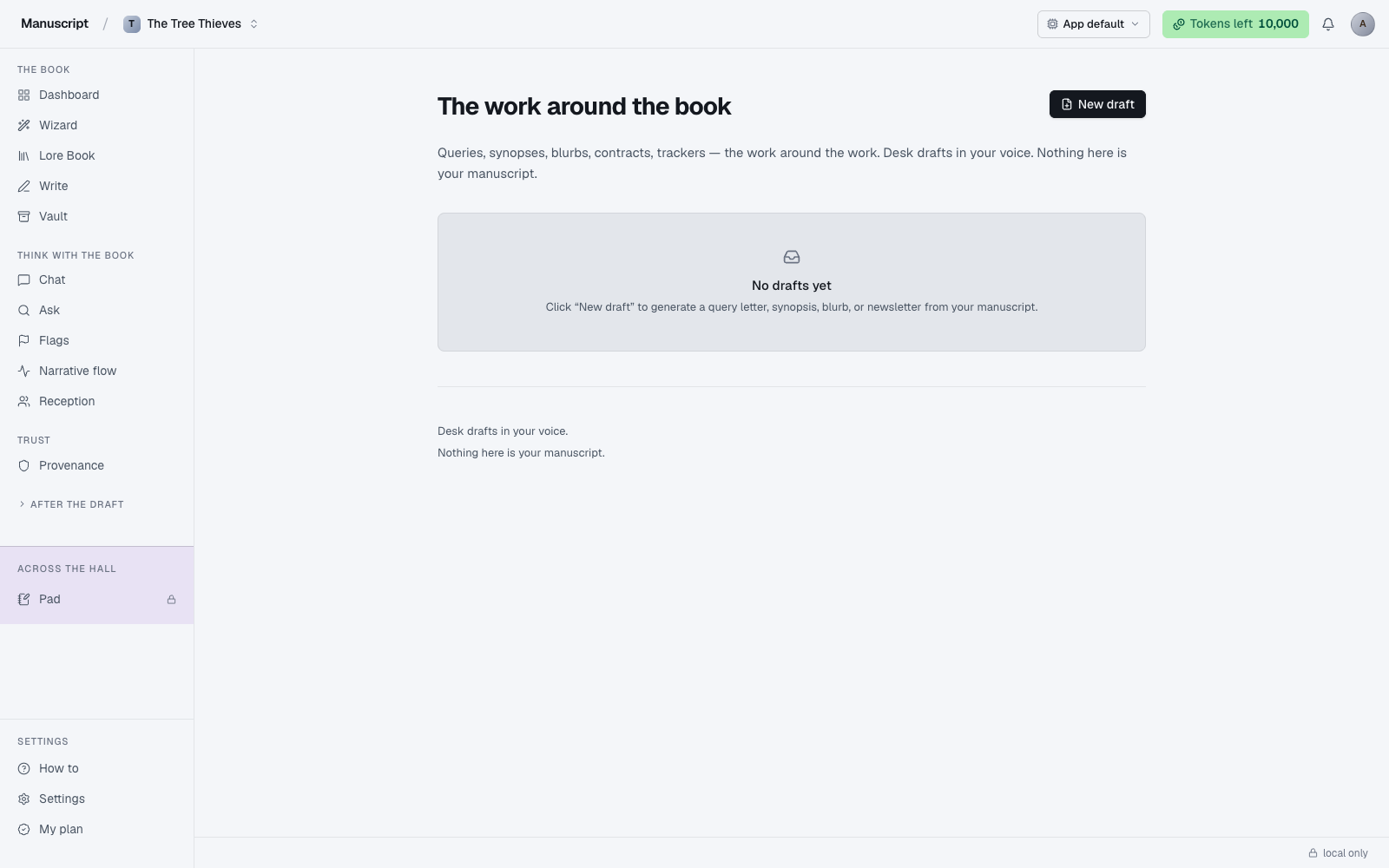
What Desk is for
Desk is the surface for the writing that surrounds the writing — the query letters, agent-facing synopses, back-cover blurbs, and reader newsletters that every finished manuscript eventually needs. It exists because those artifacts are their own craft: a query letter isn't a scene, a blurb isn't a synopsis, and each one has conventions that a general-purpose AI tends to smooth over into blandness. Desk gives you four dedicated drafts, each tuned for one specific audience.
- Query letter — for agents
- Synopsis — a one-to-two-page prose summary for agents or publishers
- Blurb — back-cover copy for the book itself
- Newsletter — an update to your mailing list, framed around the book
Every draft is generated from the same three inputs — your manuscript, your Lore Book, and the short synopsis on your Overview — plus the kind-specific shaping baked into each system prompt. If you've generated a voice fingerprint and left it on (highly recommended for Desk), all four kinds inject it. That's the difference between "AI query letter" and "query letter that sounds like it came from you."
The page header reads "The work around the book" and the subhead spells out the philosophy: "Queries, synopses, blurbs, contracts, trackers — the work around the work. Desk drafts in your voice. Nothing here is your manuscript." That last line matters — nothing you draft on Desk ever writes back into your manuscript file. It's a workshop for adjacent artifacts, not an extension of the editor.
Query letter
The query letter is the pitch: the one- or two-page letter you send to a literary agent hoping they'll ask for pages. It has a peculiar shape — personal but formal, tight but warm, informative but seductive — and most authors need a dozen drafts before one clicks. Desk gives you the starting point.
When you pick Query letter from the New-draft menu, Desk reads your title, genre, style line, and short synopsis from Overview, plus your Lore Book (especially the protagonist and the central conflict), plus your voice profile if active. It sends all of that to the LLM under a query-letter-specific system prompt and streams back a full letter: hookline, one-paragraph pitch, comp titles slot, bio slot, sign-off.
The output opens in a preview modal — select the text with your cursor to copy it into your email client or agent portal. Then edit heavily. Iterate. The first draft is a scaffold, not a finished submission. Save each iteration by clicking New draft again — you'll have a stack of versions to compare and A/B test on different agents.
Desk cannot know which comp titles are right for your book (it doesn't have market data) or which agents are open to queries in your genre — that's what QueryTracker, Publishers Marketplace, and #MSWL on X are for. Desk drafts the letter; the targeting is on you.
Synopsis
Not to be confused with the short synopsis on your Overview page. The synopsis an agent requests in a submission package is a different artifact: one to two pages of prose summarizing the entire book, including the ending, with the full arc laid out. It's the piece that shows an agent whether your plot actually works — whether the promises the opening makes get paid off, whether the antagonist has weight, whether the climax is earned.
Desk drafts one from your outline, manuscript, and short synopsis. Expect a two-page-ish document that walks through the acts, names the key characters, and reveals the ending. Then edit it — a lot. The synopsis is where many manuscripts fall apart in an agent's inbox not because the book is bad but because the synopsis reads as a plot summary rather than a story summary. Cut what's mechanical; keep what's stakes-driven.
Rerun the Synopsis kind after major revisions. Desk leans hard on your short Overview synopsis and your outline; if either has shifted (new act, new POV, cut character), the previously-generated agent synopsis will be out of date. Draft a fresh one, save it as a new version, delete the stale one — or keep it around for reference.
If your book is unusual in structure (dual timelines, unreliable narrator, nested framing), the first draft will probably need heavier intervention than the standard three-act shape. Desk is trained to describe conventional structures well; the more your book departs from convention, the more editing the synopsis needs.
Blurb
The blurb is what goes on the back cover — the marketing copy that makes a browser in a bookstore pick your book up. It's a different beast from a query letter: a query is for a professional evaluator, a blurb is for a curious stranger who will decide in fifteen seconds whether to open the book. The register is different. The pacing is different. The goal is different.
Desk drafts a blurb from your short synopsis and manuscript. Blurbs tend to run short — two or three punchy paragraphs, ending on a hook rather than a resolution. The template targets that shape by default. Iterate here more than you might on Desk's other kinds; blurbs live or die on a single sharp opening line, and getting there usually takes many attempts.
If you want more blurb variants for A/B testing (retailer listings, ad copy, a paperback rejacket), also try Atomize / Echoes — its Back-cover blurb channel produces a single atmospheric paragraph in a similar shape, and running Atomize on the same source with different channels selected gives you multiple angles at once. Desk's blurb is the higher-nuance version; Atomize's is faster and lighter.
Newsletter
For authors who maintain a mailing list. The newsletter draft is a short letter to your readers, framed around this specific book — an update on the writing, an excerpt, an anecdote from the drafting, a call to action if you have one (preorder, review, subscribe). It's a lower-stakes format than a query letter but still worth drafting deliberately: newsletter open rates and reply rates track the voice of the letter more than the news in it.
Desk drafts one from your book's contents plus a form field for the update angle (announcement, launch, cover reveal, pre-order push, and so on). The output is a full letter body — no subject line, no greeting, no signature block — that you copy into your ESP (Substack, ConvertKit, Buttondown, whatever).
Compared to Atomize / Echoes's Newsletter channel, Desk's newsletter is the higher-touch version — more nuance, slightly slower to draft, single-purpose. If you want to fan out one chapter to a newsletter and a LinkedIn post and a Twitter thread in one run, Atomize is the surface. If you're writing one careful update to your list, Desk is the one to use.
Drafts and history
Every Desk run is saved as a draft. On the Desk landing page, drafts group into two sections: queries & synopses (query letters and agent synopses) and marketing (blurbs and newsletters). Each row shows the draft title, a status pill ("draft" is the default), and a chevron; click any row to reopen the preview modal with that saved version.
Reopening a draft loads the saved content from the database — it does not re-run the AI. No new tokens are spent when you review past work. This matters for stress-testing several angles: draft three different query openings on Monday, come back Wednesday to compare, decide which to iterate on, without paying token cost for the review pass.
Drafts persist per-manuscript. Everything you draft against your novel stays with the novel; switching projects gives you a fresh list. There's no cross-book draft library — if you want a query template you use across books, save it in your Vault or paste it into a Note in the Lore Book.
Voice fingerprint and Desk
Voice fingerprint is injected into every Desk draft when it's active. This matters more on Desk than almost anywhere else in the app — the voice of your query letter is often what tips an agent from pass to request. Two query letters with identical plot beats read as completely different books when one adopts your rhythm and the other uses the default AI voice (adjective-heavy, over-metaphored, generically lyrical).
If you haven't generated a voice profile yet and you're about to draft a query, do that first. Generation takes a couple of minutes and requires ~8,000 words of your prose to read from — either from your manuscript or from Vault uploads marked as manuscript-kind. See Voice fingerprint. The payoff on Desk output is not subtle; skip this step and your query letter will read like every other AI-drafted query in that agent's inbox.
Voice can be toggled on and off from the Voice page. If your Desk drafts sound off, check the toggle first — the profile may exist but the switch may be off. Regenerating a fresh draft after flipping the toggle produces a noticeably different letter.
What Desk is not
Not a submission tool. Desk drafts the letter; it doesn't send it. Agent submission is on you — the address, the attachment format, the tracking spreadsheet, the follow-up rules of each individual agency. Every agent's submission guidelines are different and there's no automated way around reading them.
Not agent research. Desk doesn't know which agents represent your genre, which are open to queries this month, or which passed on your last submission. That research lives in QueryTracker, Publishers Marketplace, Manuscript Wish List, and — increasingly — agent-specific Twitter/BlueSky feeds. Use those alongside Desk, not instead of it.
Not marketing strategy. The newsletter draft is a draft — it doesn't tell you when to send, how often to send, or how to grow the list in the first place. For more copy variants targeted at social feeds, the Templates Marketing pack (Pro-only) has more one-off formats; for cross-channel promotional fan-out from a single source, Atomize / Echoes is the right surface.
When to run Desk
At the end of drafting, once your manuscript is close to finished and your short synopsis on Overview reflects the final book. Running Desk drafts against a synopsis that no longer matches your manuscript will produce drafts that misrepresent your book — the AI leans hard on the synopsis for all four kinds. Update Overview first, then run Desk.
If you've done a major revision (new POV, cut act, changed ending), assume every previously-drafted query, blurb, and agent synopsis on Desk is stale. Draft fresh versions; keep or delete the old ones for reference. Drafts are cheap once you've done the work of writing the book.
Don't run Desk mid-first-draft. There's no useful query letter for a book that isn't done — the shape you'd query on is likely to shift, and the AI has less to work with. Wait until your synopsis matches your book.
How to use it
- Click Desk in the left sidebar under "After the draft". The page loads with the header "The work around the book", a subhead about the surface, and (if you've drafted before) two grouped sections: queries & synopses and marketing. First-time visitors see an empty state.
- Click New draft in the top-right. A small menu opens with four options: Query letter, Synopsis, Back-cover blurb, Newsletter.
- Pick the kind you want. The menu closes and the button reads "Drafting…" with a spinner. Desk pulls your manuscript, Lore Book, and synopsis in the background and calls the LLM — expect 15–45 seconds depending on manuscript size and kind.
- When it finishes, a preview modal opens automatically with the draft title and the full generated content. Select the text with your cursor to copy it into your email client, agent portal, or wherever you're sending it.
- Close the preview modal by clicking the X in the header or clicking outside it. The new draft is now saved and shows up in the grouped list below with a status pill ("draft").
- Reopen a past draft any time by clicking its row in the list. The preview modal loads that saved version — the title, the content, the timestamp — without re-running the AI or spending more tokens.
- Before you draft, make sure your synopsis on Overview reflects the current manuscript — Desk leans hard on it for all four kinds. And verify Voice fingerprint is on if you want the drafts to sound like you rather than the default AI voice.
What to read next
- Voice fingerprint — the single biggest lever on Desk output quality
- Atomize / Echoes — for launch-time promotional writing across many channels
- Templates — for more specific copy formats not covered by Desk's four defaults