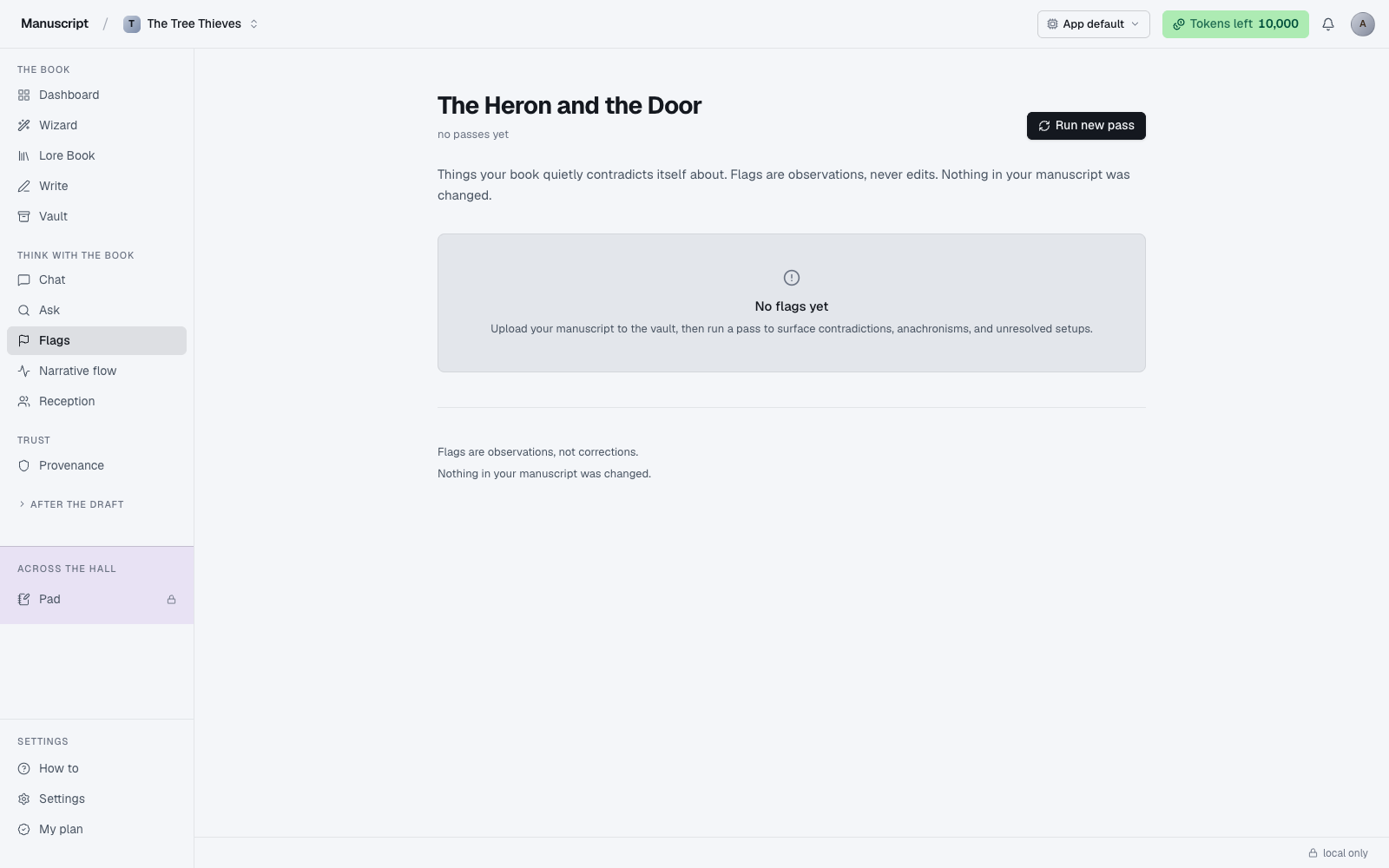
What Flags is
Flags is the diagnostic pass. You click Run new pass and the AI reads through your entire manuscript looking for four specific kinds of problem it can reliably find — the kind of things your own brain is bad at catching because it fills in the gaps from your intentions. Every finding comes back with the paragraph location, the category, a short explanation, and (where possible) a deep link that jumps straight to the paragraph in Write.
The four categories are the ones the AI is actually good at:
- Continuity — where the book contradicts itself
- Anachronism — where something is out of period for the world you've built
- Promises (unresolved) — where you set something up and never paid it off
- Repetition (repeated openers) — where the same beat, image, or phrase recurs in a way that reads accidental
The output is a structured list, grouped by category. Nothing edits your manuscript — Flags is strictly observational. The page footer prints the rule out loud: "Flags are observations, not corrections. Nothing in your manuscript was changed."
The last pass is persisted. When you land on the page you see whatever came back the last time you ran it, plus a "last pass 4h ago" meta line under the title. You don't pay tokens to look at old flags; you only pay when you click Run new pass and start fresh.
How to run Flags
Open Flags from the left sidebar under "Think with the book". You'll see the page title (which is your manuscript's title — Flags names itself after the book), a meta line reading either last pass 4h ago or no passes yet, and a Run new pass button in the top-right.
Click Run new pass. The button flips to "Analyzing…" with a spinner. Under the hood, the AI reads your manuscript in batches — a full-book pass on a 60,000-word draft takes roughly a minute or two, streaming findings back as it goes. Longer books take longer; there's no per-chapter selector today, so a run is always a whole-book run.
Running Flags on a whole book costs a meaningful chunk of tokens — see Tokens for how your weekly budget works. If you're on the Free plan, save Flags for after a substantial revision pass rather than after every editing session. If you hit your weekly limit mid-pass, a red banner appears asking you to upgrade or wait for renewal, and the pass stops; whatever came back before the limit is saved.
If a run returns nothing — no continuity issues, no anachronisms, no unresolved setups, no accidental repetition — the page shows a calm "No flags yet" card instead of an empty grid. That's a real signal, not an error: it means the AI read your book and didn't find anything in those four categories.
What each category catches
Continuity
Contradictions with what you've already written. The character's eyes were brown in chapter 2 and are described as green in chapter 12. The house had two floors, then three. The event happened on Tuesday in one scene and Friday in another. A minor character's name is spelled two different ways.
Flags reads all the way back through the book to check, which is why it costs real tokens on a long manuscript — every batch has to be evaluated in the context of every earlier batch. This is the category where the AI most consistently earns its keep, because human authors are famously bad at catching their own contradictions on the second and third pass. Your brain fills in the corrected version from your intentions; the AI only sees the words.
The finding usually includes both sides of the contradiction ("chapter 2 says X; chapter 12 says Y") so you can decide which one you meant. Click Open on the row to jump to the flagged paragraph in the editor and fix it in-line.
Anachronism
Something that doesn't belong in the period or world you've established. A 1920s character checking their phone. A fantasy character using a modern idiom ("okay, boomer"). A historical figure referenced before their birth. A regional word for a food that hadn't reached that region yet.
The AI leans on the genre and style line you set in the Wizard's Q3 and the Overview synopsis to know what period rules apply. If you're writing a contemporary novel, "anachronism" mostly won't fire — the AI isn't going to flag your character using a phone in 2025. It gets more useful the further from the present your setting sits, and most useful of all for period fiction and secondary-world fantasy where drift is easy and invisible from inside.
If you don't want anachronism findings at all (because you're deliberately anachronistic — a genre convention, a period-play choice), the current release doesn't have a category toggle, but you can ignore the ochre chip and it stays out of your way.
Promises
Setups without payoffs. You introduced a mysterious letter in chapter 3; it never comes back. A character named a rival who then never appears. A gun on the mantel that never goes off. A hint about the protagonist's past that the book forgets to pick up.
These are the hardest kind of note to give yourself while drafting, because your brain fills in the payoff from your intentions — you know what the letter was going to be about, so the letter feels resolved even though the text never resolved it. The AI doesn't have your intentions, only the text, so it flags every un-paid setup it finds. The result is often uncomfortable to read — books have more unpaid setups than authors want to admit — but it's exactly the kind of note a good editor would give you.
Some flagged promises will be false positives (the payoff exists but the AI missed the connection). Some will be things you always meant to cut. The rest are the real notes: setups that need to either be paid off or removed. Read every one, decide, move on.
Repetition
Beats, images, or phrases that recur in a way that reads accidental. "She sighed" three times in one chapter. Two different characters both described as "moving like water." The image of dawn appearing in four consecutive scenes. A gesture (the eyebrow-raise, the sardonic half-smile) that a character does over and over without variety.
Intentional repetition — a leitmotif, a callback, a deliberate refrain — is hard for the AI to tell from accidental. Read every repetition flag with a grain of salt; sometimes the flagged repetition is the reason the passage works, and the fix is to leave it alone. But most of the time the flags catch real drift, especially in dialogue tags and physical gestures, which is exactly where authors are least self-aware.
The results panel
Findings are grouped by category, in a fixed order: continuity, anachronism, unresolved promises, repeated openers. Each group has a small section header with the category label and a count next to it, then a list of rows underneath.
Each row is a compact grid with four columns:
- Category icon — a small icon on the left indicating the category (an alert circle for continuity, a clock for anachronism, a calendar for promises, a repeat arrow for repetition)
- Location — the chapter and section reference in monospace (e.g.
Ch 3, §2), with the paragraph ULID truncated below it if the flag ties to a specific paragraph - Note and detail — the AI's summary of what it found in normal text, with a longer explanation underneath in muted text
- Open — an "Open" affordance on the right if the flag can deep-link to a paragraph in the editor; otherwise a chevron sits there as a static marker
Click any row with an Open affordance to jump straight to that paragraph in Write. The editor scrolls to the paragraph and puts the cursor there, ready for you to fix it in-line. Flags never edits your manuscript, so any change you make goes through the normal editor accept flow (typing directly, or running an inline AI command and accepting the suggestion), and gets logged to Provenance if it was AI-assisted.
Persisted runs
Each Flags run overwrites the previous one — the current page always shows the most recent pass. There isn't a run history UI in the current release, so if you want to keep the findings from an earlier pass, either export the page or address the flags before running again. The upside of this simplicity is that the meta line is always accurate ("last pass 4h ago") and there's no confusion about which findings are current.
Voice fingerprint and Flags
Voice fingerprint is not injected into Flags. Flags should be observational — it's asking the AI to read your book as it is, not to imitate your voice while reading. Injecting the fingerprint would bias the analysis toward the kinds of moves you already make, which is exactly the opposite of what a diagnostic pass is for. See Voice fingerprint for the full list of what does and doesn't inject.
What Flags is not
- Not a copy edit. Flags doesn't catch typos, spelling errors, or grammar — that's the Write grammar toggle (Harper.js, running locally in the browser, free).
- Not a pacing map. For pacing across chapters, see Narrative Flow, which uses local sentiment math and doesn't cost tokens.
- Not a reader response. For how simulated readers actually react to your book, see Deep Analysis.
- Not a live check. Flags runs when you click. It doesn't watch your writing in real time — that would burn tokens on prose you're still deciding on.
How to use it
- Click Flags in the left sidebar under "Think with the book". The page loads with your last pass rendered — or an empty state if you've never run one.
- Read the meta line under the title. It shows either
last pass 4h ago(with the time since the previous run) orno passes yet. - In the top-right, click Run new pass. The button flips to "Analyzing…" with a spinner. The AI reads your manuscript in batches; a full-book pass on a 60k-word draft takes roughly a minute or two and uses a meaningful chunk of your weekly tokens (see Tokens).
- When the pass finishes, flags render grouped by category — continuity, anachronism, unresolved promises, repeated openers — each with a count and a category icon.
- Each row shows the location (e.g.
Ch 3, §2), the flag note, a longer detail line below, and an Open link on the right if the flag can deep-link to a paragraph in the editor. - Click any row with an Open affordance to jump straight to that paragraph in Write. Fix it there — Flags never edits your manuscript, so any change goes through the normal editor accept flow (and gets logged to Provenance).
- If a run returns nothing, the page shows a calm "No flags yet" card. If you've hit your weekly token limit mid-pass, a red banner appears asking you to upgrade or wait for renewal.
What to read next
- Narrative Flow — for pacing at the chapter level
- Deep Analysis — for how 100 fictional readers respond
- Provenance — where fixes you accept from Flags are logged