What Provenance is
Provenance is the ledger. Every AI-written word that enters your manuscript is recorded here — the before text, the after text, which paragraphs changed, which task did it, when it happened. Nothing gets into the manuscript file without going through the accept-suggestion flow in Write, and nothing goes through the accept-suggestion flow without being logged to this page.
If you ever need to prove — to an agent, a publisher, a contest, or yourself — how much of your book you actually wrote, this page is the answer. The Markdown export reads like a report you'd attach to a query letter; the JSON export is a machine-verifiable audit file for contests or publishers with a documented AI-usage disclosure requirement.
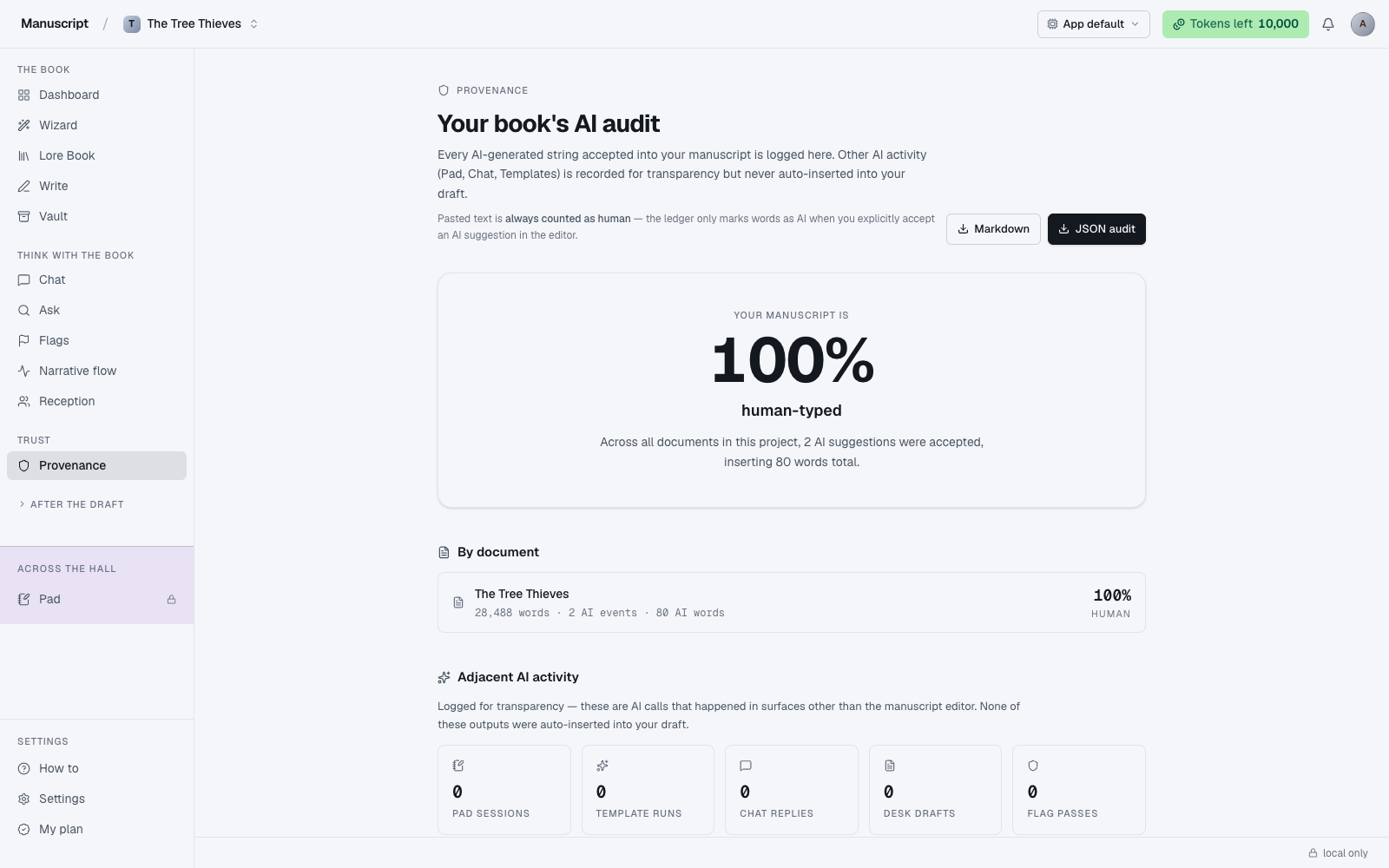
The header itself sets the frame: a small Provenance eyebrow label with a shield icon, the title "Your book's AI audit", and two lines of explanatory text that anchor the whole page — the first says AI-generated text is logged when accepted into your manuscript; the second, in a fainter tint, notes that "pasted text is always counted as human." Copy-paste from outside the app isn't detected as AI even if it originated with an AI, because the ledger only marks words as AI when you explicitly accept an AI suggestion in the editor. The honesty of that caveat is deliberate.
Two export buttons sit in the top-right of the header: a Markdown button (secondary style, for the human-readable report) and a JSON audit button (primary ink-filled style, for the machine-verifiable file). Both are point-in-time — if you accept another AI paragraph after exporting, re-export for the current state.
The hero card
At the top of Provenance, the hero card is the entire page's headline read: an eyebrow line reading "Your manuscript is", followed by one giant tabular-numbers percentage (e.g. 94%), followed by the phrase "human-typed" in a large bold weight. It's designed to be legible from across the room.
Under the giant number, a one-liner in muted text gives you the numeric context: either "Not a single AI suggestion has been accepted into your draft yet" (when the count is zero and the number is honestly 100%), or "Across all documents in this project, N AI suggestions were accepted, inserting M words total" (when there's any AI-accepted history).
The percentage is calculated from what's actually in your manuscript right now — total words minus AI-inserted words, divided by total words. If you accepted an AI paragraph and later rewrote it by hand, the rewrite counts as human, because the current text isn't the AI's text anymore. If you rejected a suggestion, it never entered the manuscript and it never enters this calculation. If you regenerated a suggestion five times and rejected all five, none of it counts.
The hero card is deliberately quiet — no chart, no color, no chart-junk. One number, one phrase, one line of context. It's the number you want to know, at the size that makes it feel like a promise.
What counts as AI-written
Only text that:
- Was generated by an AI command — the BubbleMenu inline commands in Write, Wizard drafting (Q10's "Write for me"), template runs that write directly into the manuscript.
- Was accepted — either directly, or after edits, into the manuscript file.
If you rejected a suggestion, it never entered the manuscript and never enters the ledger. If you regenerated a suggestion five times and rejected all five, none of it counts. If you accepted a suggestion and then rewrote it by hand, the accepted portion still shows in the event log for that timestamp (before/after preserved), but the current text is human — the ledger records what happened, not what's currently there.
This is the load-bearing rule of the whole app: no AI text enters your manuscript without a deliberate accept, and every accept is logged with the full before/after. There is no auto-completion, no "helpful nudge" that writes without asking, no ambient assist. The wall is enforced at the editor level, and this page is the audit trail.
What does not count as AI-written
Adjacent activity — the AI surfaces that never touch your manuscript file — are counted separately in the "Adjacent AI activity" grid below the hero card, five tiles across:
- Brainstorm Pad — the wall is structural; nothing typed there can cross into the manuscript
- Templates — template runs live in their own history; whether you copy anything from a run into your manuscript is your decision, and you'd do it via Write's accept flow, which would log it
- Chat — Chat is instructed to refuse writing prose for the manuscript
- Desk — query letters, synopses, blurbs, and newsletters live outside the manuscript file
- Flags — a diagnostic pass; it identifies problems but doesn't write
Each tile shows the count for that surface (e.g. 47 Pad sessions, 12 Template runs) with a small icon and a label. The header explanation says out loud what the tiles are for: "Logged for transparency — these are AI calls that happened in surfaces other than the manuscript editor. None of these outputs were auto-inserted into your draft."
The distinction matters because the numbers are big — an author might have 200 chat replies and 40 template runs over the course of drafting a book, and none of that inflates the AI-written percentage of the actual manuscript. The tiles are there so nothing is hidden; the percentage is there so the number you care about isn't polluted.
Between the hero card and the adjacent-activity grid, the By document section lists every manuscript document as its own row — a file icon, the document title, a monospace meta line reading "N words · X AI events · Y AI words", and a right-aligned per-document human-typed percentage in large tabular numbers with "HUMAN" as a small uppercase label underneath. This is where the ratio becomes actionable: a chapter you drafted from scratch might read 100%, a chapter the Wizard drafted for you and you accepted wholesale might read 12%. Click any document row to filter the event log below to just that document — the row highlights in the active-row color while the filter is on, and a Clear filter link appears above the log so you can easily reset. Click the same row again to toggle the filter off. If the project has no documents yet, the section shows a calm "No documents yet" placeholder instead of an empty list.
The event log
Below the adjacent-activity grid, the AI events in the manuscript section is the chronological log of every AI-accepted event. Each entry is a card with three regions.
The top row of each card carries the metadata: a small task-kind chip (e.g. rewrite, paraphrase, wizard-drafted paragraph) on a subtle background, the document title, and a formatted timestamp in monospace.
The body of each card is the signature side-by-side Before / After diff — two rounded panels laid out in a two-column grid. The Before panel sits on a subtle gray background and shows the text that was in your manuscript at the moment of the accept (which might be an empty selection if you inserted brand-new prose into a spot). The After (AI) panel sits on the warning-bg amber background — the same tint used for the highlight color throughout the app — and shows the accepted AI text with an "After (AI)" label so you can never mistake it for your own.
Under the diff, a small monospace line shows the word-count delta (e.g. 12 → 18 words), so you can see at a glance how the accept changed the length of that paragraph.
The events are sorted with the most recent at the top. If you clicked a document row to filter, only that document's events are shown. If the log is empty entirely, the section shows a calm empty card: "No AI events" with a one-liner explaining either "Your manuscript hasn't received any AI-generated text. Accept a suggestion in the editor and it'll appear here" or "No events match the current filter" depending on which condition applies.
Exporting the ledger
Two export formats live behind the header buttons:
- Markdown — human-readable. Use this for agent submissions, query-letter attachments, or your own records. It reads like a report — a summary followed by the per-document breakdown followed by the event log with before/after text formatted in Markdown quote blocks.
- JSON audit — machine-verifiable, structured, complete. Use this if you're submitting to a contest or publisher that requires a documented AI-usage disclosure and can parse structured data.
Both exports include:
- Total word count, AI-accepted character count, human-typed percentage
- Per-document breakdown
- Full event log with before / after text preserved verbatim
- An explicit
claim.summaryfield that spells out what the numbers mean: only manuscript AI events reflect AI text in the draft; adjacent activity is transparency-only
Exports are point-in-time. If you accept another AI paragraph after exporting, the export doesn't update — re-export for the current state. Both exports are deterministic given the same database state, so re-running the export at any later time will produce identical results as long as no new accepts have happened.
A footer note under the event log states this out loud for reviewers: "For publishers, agents, fact-checkers: The JSON export above contains the full audit trail in a machine-verifiable format. The Markdown export is human-readable. Both are deterministic given the same database state."
The trust rule
Every AI-written character in your manuscript goes through the accept-suggestion flow, and every accept is logged here. There is no back door.
- The Brainstorm Pad has copy-out disabled at the structural level — nothing typed there can be extracted
- Chat is instructed to refuse writing manuscript prose
- No hidden auto-completion writes into your document
- No "AI improvements" happen while you sleep
- Voice fingerprint injection changes the style of AI suggestions, but voice-injected suggestions still go through the accept flow and still get logged here
If you turn off the AI toggle in Voice fingerprint settings and never accept a single suggestion, your Provenance ledger reads 100% human-typed for the whole book — which is exactly what it will say. The number in the hero card is a true accounting, not a marketing number.
How to use it
- Click Provenance in the left sidebar under the "Trust" group. The page loads with the header Your book's AI audit and a note reminding you that pasted text is always counted as human.
- Read the hero card: one giant number, e.g.
94%, above the words "human-typed". Below it, a one-liner tells you how many AI suggestions have been accepted across the project and how many words that inserted. - Scroll to By document — a list card with a row per manuscript document. Each row shows the title, word count, AI-event count, AI-word count, and the per-document human-typed percentage on the right. Click any row to filter the event log below to just that document (click again to clear).
- Below that, the Adjacent AI activity grid shows five tiles: Pad sessions, Template runs, Chat replies, Desk drafts, Flag passes. These are counted for transparency only — none of them changed a word in your manuscript.
- Scroll to AI events in the manuscript. Each event is a card with the task kind (e.g.
rewrite,paraphrase) as a chip, the document title, the timestamp, and a side-by-side Before / After diff — the Before panel on grey, the After (AI) panel on amber. The word-count delta shows below (e.g.12 → 18 words). - If you clicked a document row to filter, a Clear filter link appears above the event log — click it to see all events again.
- To export, use the two buttons in the top-right: Markdown for a human-readable report to attach to a query letter, or JSON audit for a machine-verifiable file for a contest or publisher. Exports are point-in-time — re-export after accepting new suggestions to get the current state.
What to read next
- Write — where accepts happen
- Voice fingerprint — for the record, voice injection changes the style of AI suggestions, not the fact that they still go through the accept flow and get logged here
- The Wizard — Wizard-drafted paragraphs you accept are logged here like any other AI event