The sentence-level scan every editing pass wants first. Reads each sentence, flags the heaviest-going ones, and surfaces the paragraphs where they cluster.
Pinned at the top of the Reports panel — the "which paragraphs drag?" question, answered.
What it measures
For every sentence in your manuscript, the analyzer computes four things: word length, structural complexity (clause count, comma density, subordination depth), difficulty on the standard readability formulas (Flesch, Flesch-Kincaid, Gunning Fog, Coleman-Liau, ARI, SMOG, Dale-Chall), and a binary "long sentence" flag when word count crosses a genre-typical threshold. These per-sentence values roll up into a per-paragraph heaviness score on a 0–100 scale.
The card also computes an overall sentiment (VADER positive / neutral / negative) with a numeric score between -1 and +1, an average sentence length in words, and a total count of "long" sentences. A paragraph tips into the Difficult bucket when its score crosses roughly 70 and into the Semi-difficult bucket in the range around 50–70. Anything below is considered clean prose the reader will glide through.
Most drafts sit somewhere between 8% and 15% of sentences flagged as long, and between 3% and 8% of paragraphs flagged as difficult or semi-difficult. Below that you're often in short-punchy commercial territory; well above it and you're either writing genuinely dense literary prose or you have a revision problem.
The engine is the same Rust-based analysis pass that powers Sentence reports — Sentence analysis is the pinned, hero-styled view of that data. Both cards read the same numbers. Where they differ is layout: the hero card puts the sentiment ring, headline stats, seven readability bars, and the difficult-paragraph list all on one long scroll; the smaller Sentence reports card is a more compact recap.
Why it's useful
Long, comma-heavy, multi-clause sentences are the single most common reason a reader stops absorbing your prose and starts parsing it. It's rarely one heavy sentence that does the damage — it's three or four in a row. Sentence analysis exists to find those clusters, because they're almost invisible from inside a draft. You wrote them; you know how they're meant to flow; you can't hear their weight the way a first-time reader can.
The typical scenario: you finish a chapter, feel vaguely that "something drags in the middle," and can't put your finger on it. Open Sentence analysis. The heaviest paragraphs list will usually surface the exact stretch — often a description passage or an interior monologue where sentences kept growing while you weren't looking. Break two of them in half, cut one, and the drag disappears.
The report also complements the other stylistic diagnostics: Glue index catches sentences that are clumsy without being long (filler-heavy short ones); Passive voice catches sentences that are heavy for a structural reason; Readability gives you a book-wide grade level. Sentence analysis is where you go first because paragraph-level heaviness usually explains what all three of those are showing you.
How to read it
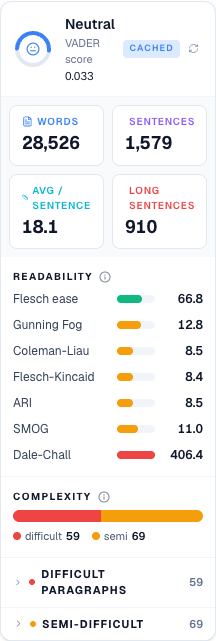
The card opens with a sentiment ring — a small donut-style SVG at the top left showing overall VADER sentiment (green smile for positive, amber neutral face, red frown for negative) with the score printed to three decimals next to it. Below the header is a 2×2 grid of colored stat tiles: words (blue), sentences (purple), avg / sentence (cyan), and long sentences (amber, or red if long sentences make up more than 40% of the total). These are your at-a-glance numbers.
Below the tiles is the Readability section: seven horizontal bars, one per formula (Flesch ease, Gunning Fog, Coleman-Liau, Flesch-Kincaid, ARI, SMOG, Dale-Chall). Each bar is colored green / amber / red based on how each formula bucketed the value (Flesch is inverted — higher is easier — so a full green bar there means accessible prose; on the grade-level formulas green means low grade, red means high grade). When most of the bars agree on a tone, the grade level is trustworthy. When they disagree, your prose has an unusual mix and you should read Readability for the caveat.
Underneath is a Complexity stacked bar showing what share of your flagged paragraphs are Difficult (red) vs Semi-difficult (amber), with the counts spelled out below the bar. Then two collapsible lists — Difficult paragraphs and Semi-difficult — each row showing chapter, a truncated quote, and the heaviness score. Clicking any row lights that paragraph up in the editor via the highlight-layer bridge, and clicking the same row again dims it. The pill in the header ("fresh" green vs "cached" blue) tells you whether the numbers just recomputed or are from a previous run.
When to ignore it
Dense literary fiction is supposed to have heavy paragraphs. If you're writing prose that leans on long sentences by design — Cormac McCarthy's runs of unpunctuated action, Sebald's page-long meditations, Faulkner's stream-of-consciousness paragraphs — expect this report to flag most of your best work. It's describing the shape of your prose, not judging whether it's wrong. The useful comparison is against a chapter from a book in your genre: run it through the analyzer, note the ratios, and target similar territory rather than trying to zero out the count.
Academic and technical nonfiction also naturally sits at higher heaviness — long sentences and multi-clause structure are load-bearing when you're expressing conditional or nested ideas. Same principle applies: compare against reference prose in your field rather than assuming green bars everywhere is the goal.
And any manuscript under 5,000 words hasn't given the analyzer enough sample for the sentiment ring or the readability formulas to be meaningful. The distributions need volume. Draft into chapter-count before treating any of these numbers as diagnostic — until then the card is more useful as a per-paragraph "which passage is dragging" pointer than as a whole-manuscript verdict.
How to run it
- Click Write in the left sidebar and open the document you want to analyze.
- Open the right-side rail: click the Reports button in the editor's top toolbar (the bar-chart icon, next to the grammar and export buttons).
- In the rail header, click the Reports tab.
- The Sentence analysis card is pinned at the very top of the panel — no expand needed. On first open it kicks off the run automatically; the header spinner shows while the external analyzer streams (5–20s). Subsequent visits render the cached result instantly.
- The card renders three stat tiles across the top — Long sentences, Heaviest paras, Avg length — over a Heaviest paragraphs list. Each row shows the chapter, a truncated quote, and a heaviness score from 0–100 (red swatch). Click a row to jump to the paragraph in the editor.
- Use the small refresh icon in the card header to force a re-run against the current text.
What to read next
- Sentence length — a companion card showing the distribution
- Glue index — for sentences that read as clumsy without being long
- Reports — back to the panel overview