What tokens are
Every time the AI in the app generates text — a paragraph in Write, an answer in Chat, a flagged passage in Flags, a channel in Atomize, a chapter draft in the Wizard — it uses tokens. A token is roughly three-quarters of a word; a 200-word response is about 260 tokens generated, plus some input tokens for the prompt that primed it. Both the input and the output count toward your bill.
Manuscripts.ai gives you a weekly rolling token budget. As you run AI features, tokens tick down in real time — the small chip in the top-right corner of every page shows your current balance and changes color as the ratio drops (green above 50%, yellow 20–50%, orange under 20%, red at 0). Every accepted AI call is recorded to the bill so you can see exactly where the budget went.
Both the Free plan (10,000 tokens per week) and the Professional plan (1,000,000 tokens per week) have weekly budgets — the number is the difference. Free is enough for evaluating the product and for lighter drafting weeks; Professional is enough to run Voice fingerprint generation, hammer inline commands, and draft chapters in the Wizard without watching the counter.
Grammar checking does not touch your budget — it runs locally in the browser via Harper.js in WASM. Neither does full-text Ask — it's a SQLite FTS5 query, no LLM call. Those two features work identically on Free and Professional with no token cost.
The weekly rolling budget
The budget resets on a rolling 7-day window, not on a calendar boundary. It doesn't reset on Sunday at midnight; it doesn't reset on the first of the month. Instead, the oldest calls roll out of the 7-day window as new time passes, and their tokens return to your available pool. In practice: if you use the app every day, your budget is topping up continuously — a call you made 6 days and 23 hours ago will free up its tokens an hour from now.
That rolling model means you'll rarely hit a hard "you're out until next reset" moment unless you burn a huge chunk in one sitting. On the Free plan, running a single Voice fingerprint generation or an Atomize batch across all eight channels can consume most of your weekly budget in one operation — after which you'd wait for older activity to roll off. On Professional, that same operation is a small fraction of the weekly ceiling.
The /tokens page shows exactly when the budget next has significant headroom: the Token resets at line at the bottom of the receipt gives you the date and time along with a relative "in Nh" or "in Nd" hint, so you can plan around it.
Model deduction multipliers
Different AI models cost different amounts to run. Cheaper models deduct fewer tokens from your budget per generated word; more expensive models deduct more. Most of the app uses a single default model (currently google/gemini-2.5-pro — chosen for a balance of quality and cost), so you don't have to think about model choice most of the time.
Where the choice matters, the interface tells you: if a surface offers a "deep" model option that's more expensive, the label will say "Running this on the deep model uses 3x tokens" or similar. You decide whether the extra depth is worth the extra spend for that specific task. Standard runs stay on the default model.
The model choice for Deep Analysis is separate — that's a credit purchase, not a token draw. See Deep Analysis credits.
The token bill
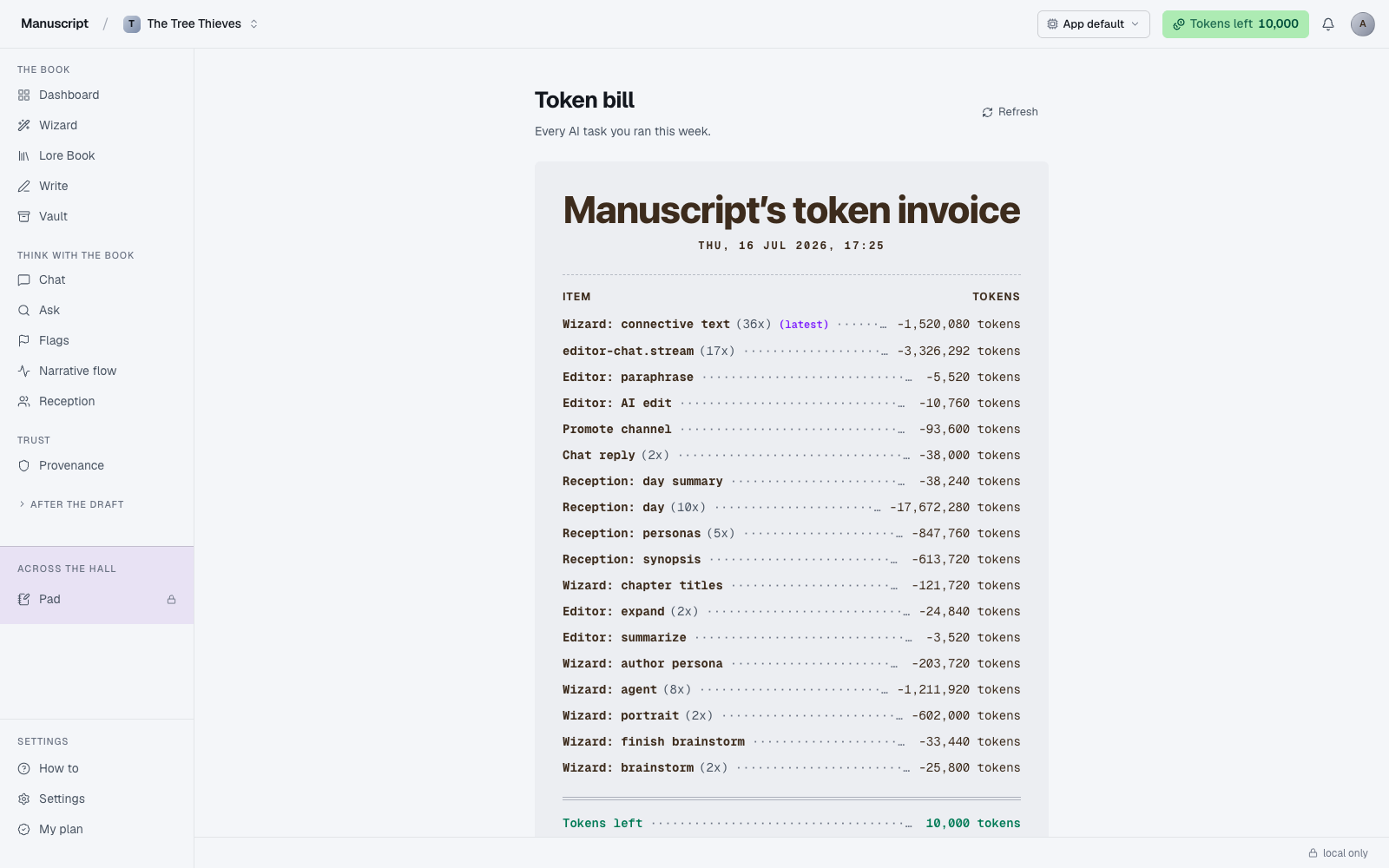
Open Tokens to see this week's bill. The page header reads Token bill with a subtitle "Every AI task you ran this week." Below the header sits a receipt-styled card titled "Manuscript's token invoice" showing today's date and every AI call grouped by (feature + model) into a single line item.
Each row on the receipt shows:
- The task label (Wizard: connective text, Inline: Continue, Templates: Rewrite, Chat: response, Voice: fingerprint, Desk: Query letter, Atomize: newsletter, and so on)
- A count in parentheses if the same task ran more than once ("(24x)" for twenty-four Wizard connective calls)
- The token cost with a leading minus ("-419,000 tokens")
- A violet (latest) tag on the most-recent group so you can see what you just did
Below a double-rule at the bottom (like a real receipt), the summary shows Tokens left in green, Total weekly tokens, and Token resets at with the relative hint. A closing "— Thank you for writing —" caps the receipt.
This is the transparency page. If you're wondering where your budget went, it's here — every AI call rolled up into a scannable list, grouped so you can see patterns rather than a wall of individual events.
What burns tokens fastest
In rough descending order, these are the operations that consume the most budget per invocation:
- Narrative Flow on a full manuscript — reads every chapter, one pass per book. Big single spend.
- Flags on a full manuscript with all four categories — reads every chapter for four different kinds of check (continuity, anachronism, promises, repeated phrasing). Big single spend, four passes.
- Atomize across all eight channels — one run, eight parallel generations from the same source. Multiplicative, since each channel is a separate LLM call.
- The Wizard's chapter drafting step — writes prose paragraph by paragraph for a full chapter. Roughly 50,000 tokens per chapter, and a book has many chapters.
- Voice fingerprint generation — a one-time cost that reads up to 8,000 words of your prose. Not repeated often, but nontrivial the first time.
- Long inline commands with big selections — Rewrite on a 500-word passage costs roughly ten times what Rewrite on a 50-word passage costs. The input is billed too.
What's cheap:
- Short inline commands on small selections (a sentence or two)
- Chat with scene scope (small context window, small response)
- Templates on short passages (a paragraph, not a chapter)
- Ask (zero tokens — full-text search only, no LLM call)
- Grammar checking (zero tokens — runs locally in WASM)
- Reading past runs (Templates recent, Desk drafts, Atomize history — no re-generation, no cost)
The pattern: token cost scales with both the input length (what the AI has to read) and the output length (what it has to write). Small in, small out = cheap. Whole-book in, whole-book out = expensive.
When you run out
The budget hits zero when you've spent your full weekly allowance in the last 7 days. When that happens:
- AI features stop generating on the next call — the response returns a 402 status and you'll see the upsell modal ("Out of tokens. Upgrade or wait for renewal.") on any surface that tries to run.
- Everything non-AI keeps working — the editor, grammar checking, Provenance, Ask, the Lore Book, the Outline, the Vault, reading past runs on Templates/Desk/Atomize.
- The budget refills gradually as older calls roll out of the 7-day window. The
/tokenspage's Token resets at line shows when significant headroom returns.
If you regularly hit zero on the Free plan, that's the signal to consider Professional. The upgrade takes effect immediately — see Plans. If you only hit zero occasionally, wait out the rolling window and plan the heavy operations (Voice generation, Flags on full manuscript, Atomize batches) around when the budget has room.
Deep Analysis and tokens
Deep Analysis does not come out of your token budget. It uses a separate single-use credit priced at $55 per simulation. See Deep Analysis credits for the full model.
The reason: a Deep Analysis simulation costs roughly 100,000 tokens of LLM work — 100 fictional readers reading your entire manuscript over five simulated days. On the Free plan that's ten times the weekly budget; on Professional it's a tenth. Either way, letting one simulation silently consume the equivalent of a normal week (or more) of your ordinary AI usage would be a nasty surprise. Making it a separate credit keeps the two resources visibly independent — running a simulation doesn't consume your inline commands, and hammering inline commands doesn't drain your simulation capacity.
Credits also don't expire when unused. Tokens roll off the 7-day window; credits sit in your account until spent.
Tokens across manuscripts
Your token budget is per-account, not per-manuscript. If you have two manuscripts going and burn tokens heavily in one, the other's token allowance is affected — they share the same pool. There's no way to allocate a slice of your weekly budget to one specific book.
The /tokens page shows spend across all your manuscripts, grouped by task rather than by book — a template run against Book A and a template run against Book B both appear as "Templates: Rewrite" rows on the same bill. That grouping is deliberate: it optimizes for "where is my time going" over "which book cost more this week."
Deep Analysis credits also live at the account level. A credit purchased for use on Book A can be spent on Book B; the credit doesn't care which manuscript the simulation runs on.
What tokens are not
- Not a payment. Tokens are budget units within your plan, not a currency you top up. You don't pay per token — you pay for the plan, and the plan gives you a weekly token allowance.
- Not a currency. You can't buy just tokens à la carte. If you regularly need more, upgrade to the plan that fits your usage.
- Not the same as Deep Analysis credits. Those are separate, single-use, and priced at $55 each. Credits fund one specific product (the Reception simulation); tokens fund everything else.
- Not the same as manuscript word count. A 100,000-word manuscript is not 100,000 tokens of anything unless you feed it to the AI. It just sits on your disk (and in your Vault index) at no token cost.
How to use it
- Click the Tokens left chip in the top-right of any page (the colored pill with a coin icon — green above 50%, yellow 20–50%, orange under 20%, red at 0). It's a link to
/tokens. - The page loads with the header Token bill and a subtitle: "Every AI task you ran this week." At the top of the receipt card is Manuscript's token invoice with today's date.
- Read the receipt. Every AI call is collapsed into a single row per (feature + model) with the label ("Wizard: connective text", "Inline: Continue", "Templates: Rewrite", etc.), a count in parentheses if there's more than one call, and the token cost. The most-recent group is tagged (latest) in violet.
- Below the double-rule at the bottom of the receipt, check the summary: Tokens left (green), Total weekly tokens, and Token resets at (with a relative "in Nh" or "in Nd" hint).
- Click History rows below the receipt to drill into a single past day. The default row is This week (everything in the rolling 7-day window). Any day with activity has its own row showing the day, call count, and token total; click it and the receipt above filters to just that day.
- If admins have granted you tokens, a Credits granted (all time) row appears in the History section with a positive delta (e.g. "+500,000 tokens"). Grants are excluded from the daily totals so consumption stays honest.
- Click the Refresh button in the top-right to re-fetch balance and history without reloading the page. If your Tokens left chip goes red, you're at zero: AI features stop generating until older calls roll out of the 7-day window, or you can upgrade — see Plans.
What to read next
- Plans — Free vs Professional
- Deep Analysis credits — the separate credit system
- Voice fingerprint — generating one is a one-time token cost that pays off across every surface