The two plans
Manuscripts.ai has two subscription plans: Free and Professional. Both include the entire product — every surface, every feature, every AI tool. The only difference between them is how much AI work you can do per week.
- Free — full access to the editor, the Lore Book, the Outline, and every AI surface, with a weekly rolling token budget of 10,000 tokens. Meant for evaluating the app and for lighter drafting weeks.
- Professional — same features, a much larger weekly budget of 1,000,000 tokens. $29 per month or $300 per year (roughly 17% off the annual plan versus paying monthly).
Both plans include the Wizard, Chat, Flags, Templates, Desk, Voice fingerprint, Atomize, Provenance, the Vault — everything. The Marketing & Business pack in Templates is behind a Pro lock (18 Author-pack templates are unlocked on Free; the 22 Marketing/Professional templates require Pro), but no other feature is gated.
Neither plan includes Deep Analysis simulations. Those are separate single-use credits — a Deep Analysis simulation costs roughly 100,000 tokens (a tenth of the Free weekly budget in one call) and is priced separately at $55 per credit. See Deep Analysis credits for the full model.
The Free plan
The Free plan gives you the full product with a weekly rolling token budget of 10,000 tokens. Everything non-AI (the editor, grammar checking, Ask via full-text search, the Vault, Provenance, the Lore Book, the Outline) works without touching the budget at all — those surfaces don't call the LLM. What burns budget is the AI features: inline commands, Chat responses, Wizard drafting, template runs, Desk drafts, Atomize channels, Flags scans, Narrative Flow analyses, and Voice fingerprint generation.
At 10,000 tokens per rolling week, the Free plan is enough for evaluating the product and for lighter drafting weeks — a few inline commands, some Chat conversations, occasional template runs. It's not enough for heavy AI-assisted drafting: running Flags on a full manuscript, generating a Voice fingerprint, or running Atomize across all eight channels will consume most or all of a weekly budget in a single operation.
The Free plan includes:
- The full editor and every non-AI feature
- A weekly rolling token budget of 10,000 tokens (resets on a 7-day window from your first spend)
- Grammar checking, which is local Harper.js in WASM and doesn't touch tokens at all — see Write
- Full Provenance ledger (every accepted AI suggestion recorded, with export)
- Full Vault (uploads, indexing, search)
- 18 Author-pack templates (Marketing & Business pack is Pro-only)
- Everything else in the app
See Tokens for how the budget is measured, what a token actually is, and what burns the fastest.
The Professional plan
Professional gives you the same features and a much larger weekly budget — 1,000,000 tokens per rolling week, 100x the Free plan. That's enough headroom to run Voice fingerprint generation regularly, to draft chapters in the Wizard, to run Atomize across all eight channels for a launch, and to hammer inline commands without watching the counter.
Two billing options:
- Monthly — $29 per month, billed on the day you subscribed
- Yearly — $300 per year, billed on subscription day. Effectively ~17% off compared to paying monthly ($29 × 12 = $348 vs. $300).
The token budget is identical on monthly and annual — the annual plan just saves you money. Pro also unlocks the Marketing & Business pack in Templates (22 additional templates for LinkedIn posts, product descriptions, ad copy, and business writing).
Upgrade from the Pricing page inside the app, or via the CTAs on My Plan. The upgrade takes effect immediately on payment — your token budget resets to the Professional limit within a minute, and your account tier flips over. Your existing manuscripts, lore, voice fingerprint, and Provenance ledger carry over untouched. Nothing about your work changes; only the ceiling goes up.
The My Plan page
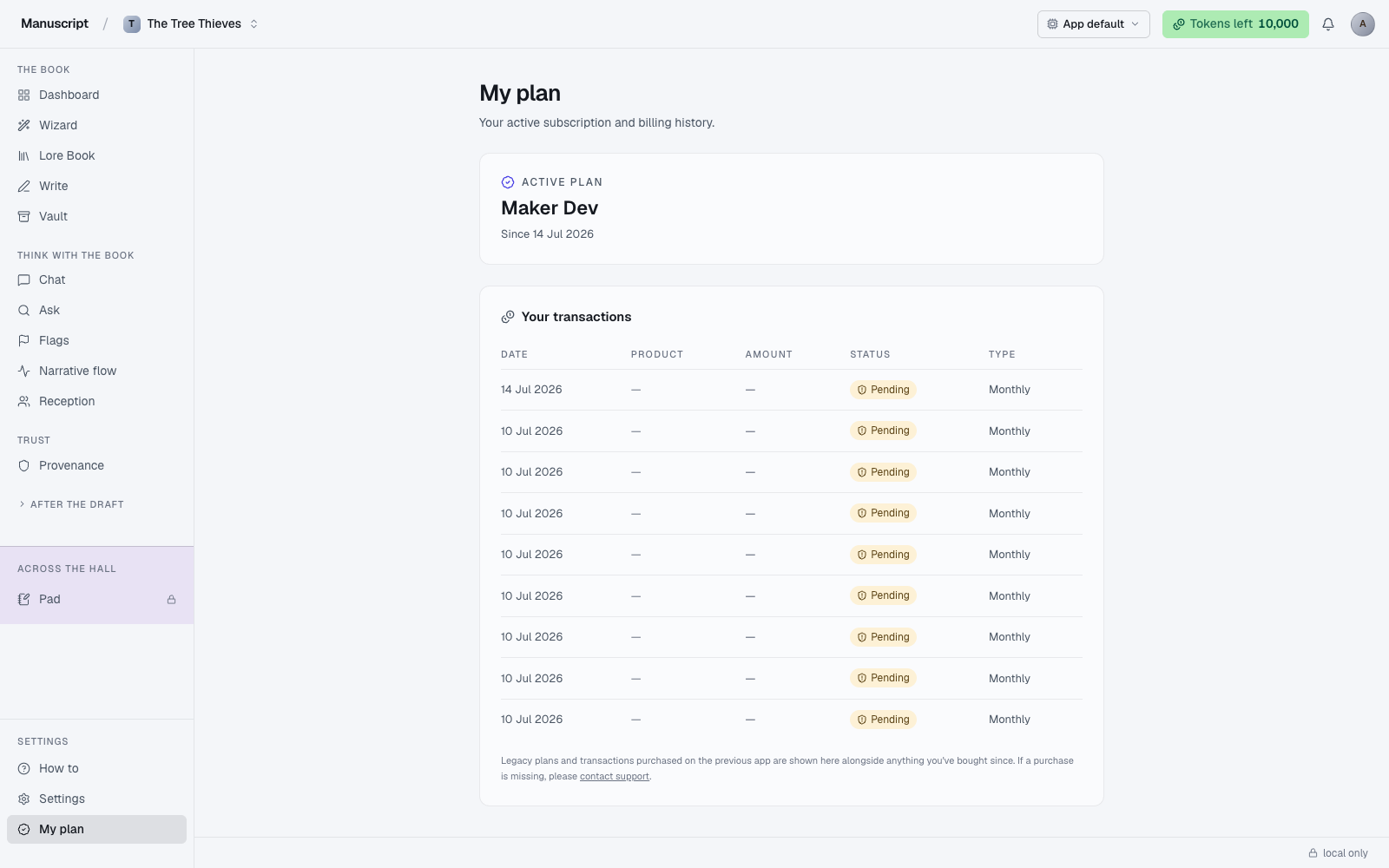
Open My Plan to see the current state of your subscription. The page loads with the header "My plan" and a subtitle "Your active subscription and billing history." The layout has two main sections: an Active plan card at the top (showing your product, subscribe date, and management actions) and a Your transactions table below (full billing history).
If your subscription is active or you're an admin, the Active plan card shows:
- Your product name (e.g. "Professional — Annual" or "Professional")
- The date you subscribed ("Since Jul 10, 2026")
- If you're on the monthly plan and not an admin, an Upgrade to annual button in the top-right that opens the ThriveCart checkout with your email and name pre-filled
If your last renewal failed, you'll see an amber Your subscription is inactive banner instead — a warning that a card was declined, expired, or a bank blocked the charge — with Reactivate my plan and Switch to annual instead buttons that take you to the checkout to fix it.
The Your transactions table below shows every subscription payment and Deep Analysis credit purchase with: Date, Product, Amount, Status (Active / Inactive / Verified / Pending), and Type (Annual / Monthly). This is your accountant's record — save the receipts you need from here. A small note at the bottom acknowledges that legacy plans purchased on the previous app are shown alongside newer purchases; if a purchase is missing, contact support.
Upgrading from Free to Professional
Open My Plan or go directly to the Pricing page. Choose the cadence (Monthly $29 or Yearly $300 — the yearly toggle shows a "Save ~17%" badge). Click Upgrade to Professional and complete checkout with our payment processor (ThriveCart is the current back-end; a Stripe integration is on the roadmap).
Your account tier flips within a minute of the payment clearing. Your weekly token budget resets to the Professional limit and the Marketing & Business pack unlocks in Templates. Nothing else changes about your account — same manuscripts, same lore, same voice fingerprint, same everything.
If you were signed in when you started checkout, ThriveCart's Contact section pre-fills with your email and display name from /api/auth/me. You won't need to retype your account information.
Cancelling Professional
Open My Plan and scroll to the Cancel subscription block at the bottom of the Active plan card. (This block is visible only for legacy-backend plans; Supabase-managed plans will use a different cancellation flow when it ships.) Click Cancel plan — a confirm panel appears with an optional "reason" textarea. Fill in the reason if you feel like it (it helps us improve; skip if you don't), then click Confirm cancel to submit or Keep plan to back out.
Cancellation is effective at the end of your current billing period. If you paid for the year, you keep Professional through the end of that year; if you paid for the month, you keep it through the end of that month. There are no pro-rated refunds mid-cycle — the payment you already made stays applied to the current period.
After the cycle ends, your account moves back to the Free plan. Your manuscripts, lore, voice fingerprint, Provenance ledger, Vault uploads, and everything else all stay — nothing is deleted at any point in the cancellation process. AI commands continue to work; the only change is that the weekly token budget drops to the Free level.
If you had unused Deep Analysis credits at the time you cancelled, they stay on your account. Credits do not expire when you downgrade, and they are not consumed by the plan change.
What happens if I stop paying mid-book
Your manuscript stays. Editing keeps working. Grammar checking keeps working (it's local). Provenance keeps working. Read FAQ for the full answer on account state after cancellation.
The AI commands throttle to the Free budget — 10,000 tokens per rolling week. Some things that were easy on Professional (running Flags on a whole book, generating a fresh Voice fingerprint every month, atomizing across all eight channels for a launch) get harder — you'll need to break them into smaller runs, prioritize what matters, or wait through weekly resets before running the next big thing.
You don't lose anything you've written. The wall is that you might have to slow down on new AI work until you re-subscribe. Everything you produced while paying stays intact — accepted AI suggestions in your manuscript, Provenance entries, Desk drafts, Atomize runs, Template histories.
Refunds
We don't have a self-service refund flow for subscription payments. If you subscribed by mistake, or immediately want to reverse a purchase (wrong plan, duplicate charge, changed your mind within minutes), email support within a reasonable window and we'll handle it manually. Include your account handle and the transaction date; both are on the My Plan transactions table.
Deep Analysis credits have their own refund rules — a credit is only consumed when the LLM cascade actually starts, so precheck failures (word-count too low, synopsis too thin) refund automatically. Post-cascade failures are support-only. See Deep Analysis credits for the complete refund policy.
How to use it
- Click My plan in the left sidebar (or Pricing if you've never subscribed — the entry swaps automatically once your first payment clears). The page loads with the header My plan and a subtitle "Your active subscription and billing history."
- If your subscription is active or you're an admin, an Active plan card shows your product name (e.g. "Professional — Annual"), the date you subscribed, and — if you're on the monthly plan — an Upgrade to annual button in the top-right. If your last renewal failed you'll see an amber Your subscription is inactive banner instead with Reactivate my plan and Switch to annual instead buttons.
- Scroll down to Your transactions for the full billing table: Date, Product, Amount, Status (Active / Inactive / Verified / Pending), and Type (Annual / Monthly). This is your accountant's record — save receipts from here.
- To upgrade from Free to Professional, go to the Pricing page (or click the upgrade CTA on any surface). Pick Monthly ($29/mo) or Yearly ($300/yr). Complete checkout — your account tier flips within a minute of payment clearing, and your token budget resets to the Professional limit.
- To upgrade from monthly to annual, click Upgrade to annual on the Active plan card. It opens ThriveCart with your email and name pre-filled. Your remaining monthly balance rolls over automatically.
- To cancel, scroll to the Cancel subscription block at the bottom of the Active plan card (visible only for legacy-backend plans). Click Cancel plan — a confirm panel appears with an optional "reason" textarea. Click Confirm cancel to submit or Keep plan to back out. Cancellation is effective at the end of your current billing period; you keep Pro until then, no pro-rated refunds mid-cycle.
- If you subscribed by mistake or need a refund, email support directly — there's no self-service refund flow. Downgrading keeps every manuscript, lore entry, voice profile, and Provenance record intact; only your weekly token budget drops to the Free level.
What to read next
- Tokens — how your weekly budget is measured and where it goes
- Deep Analysis credits — the $55 single-use credits, separate from subscription
- FAQ — the most common billing questions