What De-slop is
De-slop is a rules-based rewriter that removes the tells of AI writing without flattening your voice. It strips the throat-clearing openers ("In today's world…", "It's important to note that…"), the faux-insight setups ("Here's the thing:", "Studies show that…"), the importance puffery ("truly meaningful", "in ways that are"), and a growing list of banned filler words — and leaves everything that was actually yours.
You can use it two ways: paste-and-rewrite on the standalone page here (nothing gets logged to your manuscript), or select-and-run from the Write editor's BubbleMenu (that path IS logged to Provenance if you Accept the result). If Voice fingerprint is on, the rewrite respects your voice-lock — De-slop won't smooth your intentional short sentences into "improved" mush.
De-slop is not a paraphraser, not a summarizer, and not a grammar fixer. It's a targeted deletion pass. The output should read like your draft with the slop scissored out, not like a different piece of writing.
The standalone page
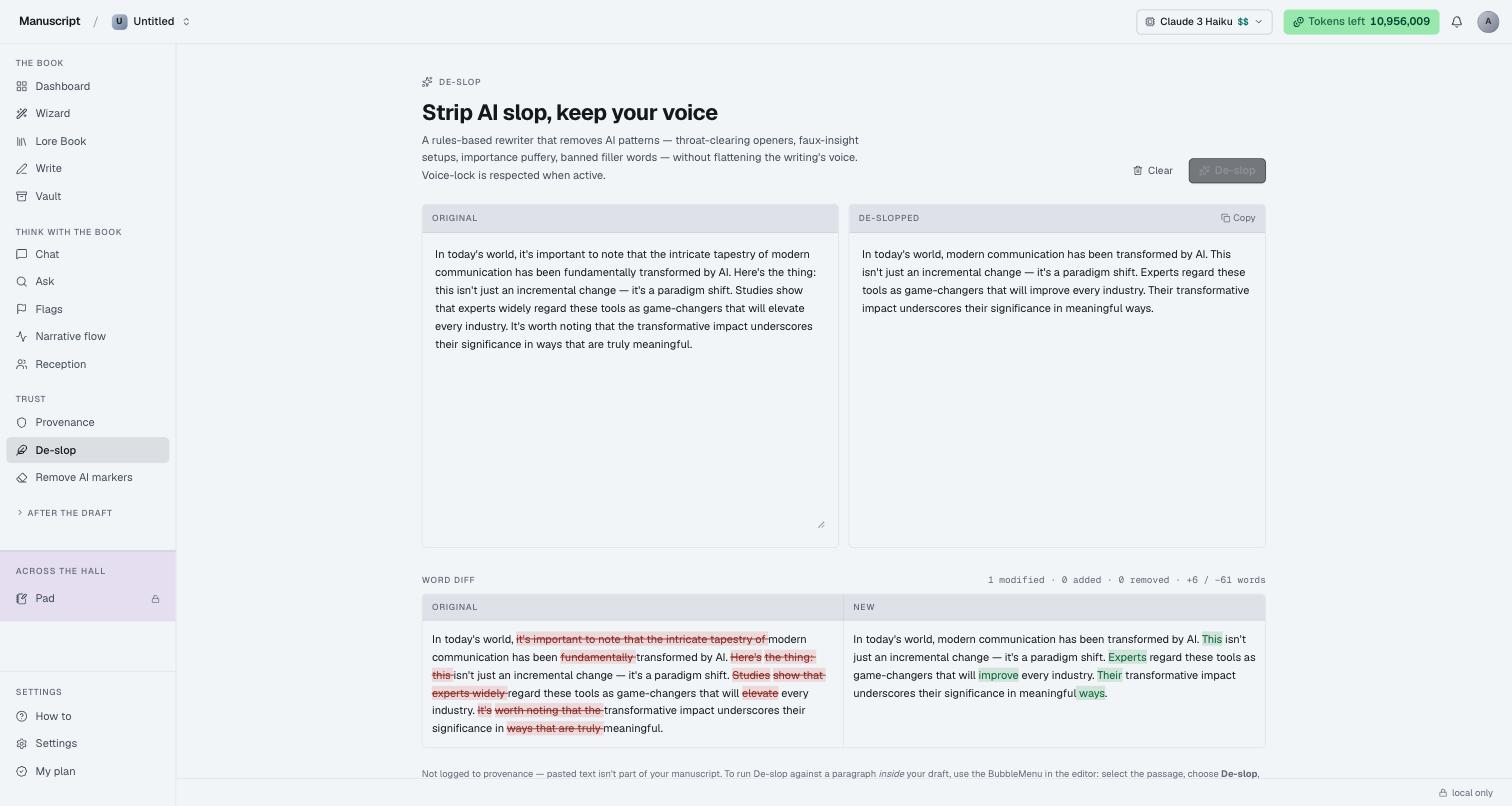
The page splits horizontally: ORIGINAL on the left, DE-SLOPPED on the right, with a De-slop button in the top-right of the header and a Try a sample link on the Original panel so you can see the effect without pasting anything of your own.
Type or paste any AI-heavy draft into the Original panel and press De-slop. The rewrite streams into the right pane token-by-token. When it finishes, a word diff panel appears below the split — the same two texts laid out side-by-side, with removed slop struck through in a warm red highlight on the left and new phrasing shown in green on the right. A one-line stats row above the diff summarises what changed: N modified · N added · N removed · +N / −N words.
A Copy button appears in the top-right of the De-slopped panel once output exists. A Clear action next to it resets both panes.
The footer note is deliberate: "Not logged to provenance — pasted text isn't part of your manuscript. To run De-slop against a paragraph inside your draft, use the BubbleMenu in the editor: select the passage, choose De-slop, and accept the suggestion. That path is logged." The standalone page is for exploration and one-shot cleaning; the editor path is for the manuscript.
De-slop inside the editor
The same rewriter is wired into the Write BubbleMenu as its own inline command, sitting in the AI dropdown alongside Rewrite, Paraphrase, Content Improver, and the rest.
Select any paragraph or run of prose, open the AI menu, pick De-slop. The suggestion sheet slides in from the right with the rewrite streaming, the original selection stays highlighted in purple so you can see the "before" side by side with the "after" text, and you get the standard Accept / Reject buttons at the bottom.
Accept and the selection is replaced with the de-slopped text — and an event is written to Provenance with the before-text, after-text, task kind (deslop), and paragraph IDs. Cmd+Z undoes it in the editor; the provenance record still stands for the moment it happened. Reject and nothing changes; the sheet closes.
If Voice fingerprint is trained and its "inject into editor commands" toggle is on, the De-slop rewrite is voice-locked — same as every other in-editor AI command. Voice-injected De-slops still go through Accept and still land in Provenance; the voice injection changes the style of the rewrite, not the rule that AI text is only in your manuscript when you deliberately accept it.
What De-slop removes
The rule set targets patterns not words in isolation, so the following ledger is illustrative rather than exhaustive:
- Throat-clearing openers — "In today's world," "In the modern era," "It's important to note that," "It's worth mentioning that," "Interestingly enough,"
- Faux-insight setups — "Here's the thing:", "The truth is:", "Studies show that experts widely regard…"
- Importance puffery — "truly meaningful," "in ways that are," "profoundly impactful," "underscores their significance"
- Filler transitions — "Furthermore," "Moreover," "Additionally," when they're glue rather than signposts
- Empty intensifiers — "very," "quite," "really," "literally," in adjective stacks where they aren't earning their place
- Meta-commentary that doesn't move the sentence forward — "Notably," "It should be pointed out that," "One might argue that,"
The list is tuned to fictional prose in the context of author drafting; it isn't a general "sound smarter" filter. If you write commercial nonfiction with intentional signposts, some of the deletions may feel over-eager — that's what Reject is for.
What De-slop leaves alone
- Your voice signatures (sentence-length distribution, intentional fragments, ellipses)
- Domain vocabulary (technical terms, character names, invented words)
- Dialogue verbatim (the rewriter never touches text inside straight or smart quotes)
- Structural markup (paragraph breaks, chapter titles, blockquote formatting)
If a passage of yours has cadence or rhythm that leans on repetition, De-slop won't smooth it. The rewriter's default posture is cut, don't rephrase — when in doubt, it leaves the sentence alone.
When to use it
- After Wizard-drafted paragraphs — the Wizard's Q10 "Write for me" pass is a common source of throat-clearing that De-slop is tuned to catch
- After a chapter you dictated and let auto-transcription clean up
- After a manuscript import from any AI tool you were using before
- On any single paragraph where you can feel the AI tells but can't quite name them — run De-slop, see the diff, decide
De-slop isn't a nightly-cron pass. It's a targeted tool you reach for on paragraphs you know are wobbly. Running it on every paragraph in your book indiscriminately will produce a manuscript that's uniformly de-slopped but also uniformly interfered-with; the rule-set is opinionated, and the opinion isn't always right for you.
How to use it
- Standalone: Sidebar → Trust → De-slop. Paste your text into the Original panel (or press Try a sample to see the effect on a known-slop paragraph), then press De-slop in the top-right. The rewrite streams into the right pane; the word diff opens below. Press Copy on the De-slopped panel to grab the result.
- Standalone doesn't touch your manuscript — text pasted here is treated as one-off. Nothing is logged, nothing is stored server-side beyond the LLM call itself.
- In the editor: Open a document in Write. Triple-click a paragraph, or drag to select a passage. In the BubbleMenu that appears, click the AI dropdown. Choose De-slop.
- The suggestion sheet slides in from the right. Your original selection stays highlighted in purple. The rewritten text streams into the sheet with a blinking caret while it generates.
- Press Accept to replace your selection with the de-slopped text. An event is written to Provenance with the full before/after. Press Reject to close the sheet without changing anything.
- Cmd+Z (Mac) or Ctrl+Z (Windows) undoes the edit in the editor; the Provenance record still stands as a record of what was proposed and accepted at that moment.
What to read next
- Remove AI markers — the deterministic, LLM-free counterpart for stripping invisible watermarks and normalizing spaces
- Provenance — where every accepted De-slop event lands
- Voice fingerprint — how voice-lock interacts with De-slop and every other in-editor AI command
- Write — the editor and BubbleMenu that host the in-manuscript path