Figures out who's saying what. Flags lines where the speaker is ambiguous (no "said X" nearby) so a reader doesn't get lost in conversations.
What it measures
The analyzer walks every quoted line in your manuscript and attempts to assign it to a specific character. To do that it uses three signals in order of preference: explicit dialogue tags nearby ("said Ada", "Owen whispered", "she asked"), action beats that identify the speaker in the same paragraph as the quote ("Ada set down the glass. 'You promised.'"), and the previous confirmed speaker in the conversation, applying the standard convention that unattributed alternating lines in a two-person exchange belong to the character who didn't speak last.
Each attribution comes with a confidence percentage from 0% to 100%. Lines with strong explicit tags typically resolve at 90%+ confidence. Lines resolved by turn-taking convention tend to sit in the 60–90% range depending on how many exchanges have passed since the last tag. Lines the analyzer can't assign with reasonable confidence — three characters in the room, no tag, no beat — get flagged with a "best guess" speaker (or "?") and a confidence in the 20–60% range.
The card surfaces three headline counts: total lines (quoted lines detected), ambiguous (count of lines flagged below the confidence threshold, typically 60%), and speakers (distinct characters attributed). The deeper data also includes an attribution accuracy estimate — the analyzer's overall self-scored confidence across the manuscript, useful as a top-line indicator of how clean your dialogue is at reader-side.
Why it's useful
Ambiguous speaker attribution is one of the top reasons readers back out of a scene. You wrote both characters, so you always know who's speaking — the tag in your head runs invisibly for every line. The reader has no such tag. When three unattributed lines pile up in a row and the reader has to backtrack to figure out who's saying what, they stop absorbing the scene and start doing arithmetic.
The typical scenario: a two-person conversation runs for a page and a half. You put a tag on line one and line two, then let it run because you know how it flows. But by line fifteen the reader has lost the thread and has to count backward to figure out whether the last line belonged to Ada or Owen. This report tells you exactly where that count-backward is going to happen — usually a specific line where the confidence drops below 60% because too many turns have passed without a re-tag.
The fix is almost always small: add a beat ("Owen closed the drawer.") before the ambiguous line, add a tag ("Ada said") to it, or give one of the two characters a distinctive turn of phrase that identifies them without needing attribution. This report is a targeted worklist for that fix — not a full dialogue rewrite, just "add a beat here" three or four times per chapter.
Use it alongside the Dialogue tag distribution section in the Deep analysis block below the reports rail — that panel shows which tags you're using ("said" should dominate; a long tail of fancy tags is often over-writing). Together they give you both the "when am I under-attributing?" and "am I over-attributing with weird verbs?" halves of dialogue hygiene.
How to read it
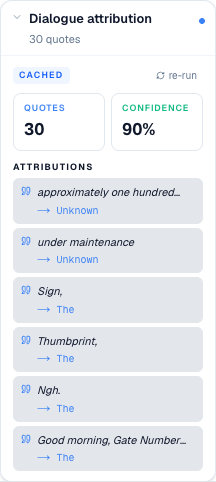
The card opens with two stat tiles: quotes (total detected quoted lines, in blue) and confidence (the manuscript-wide attribution accuracy estimate, in green). Below that is an Attributions section — a list of individual quoted lines, capped at six per view. Each row shows the quote in italics with a leading quote icon in blue, and below the quote an arrow pointing to the assigned speaker in mono type ("→ Ada").
Lines that resolved with high confidence render with a light neutral background. Ambiguous lines — where the analyzer flagged the attribution as low-confidence — render with a subtle red-tinted background and the speaker shows as "?" or a best-guess name with a low percentage. Click any row and the editor jumps to that line in the prose, so you can read the surrounding context and see whether the ambiguity is real or the analyzer just missed a tag your eye would have caught.
The collapsed card summary shows just the total quote count ("214 quotes"), so you can see the volume of dialogue at a glance without expanding. When you dig in, the useful pattern is not the total count of ambiguous lines but where they cluster — three ambiguous lines in the same scene usually means that scene needs a fresh anchor tag, not that all three lines individually need work.
Fix the clusters first. Then run through any remaining single-line ambiguities and decide whether each is worth fixing on its own or whether the surrounding beats already give the reader enough scaffolding to make the right assumption.
When to ignore it
In a stylistically-driven scene where you're deliberately blurring who's speaking — a chorus, a hallucination, an argument that's meant to feel like one continuous voice, a poetic exchange where identity dissolves — the attribution ambiguity is part of the point. Dismiss those flags. The report has no way to distinguish "ambiguity as accident" from "ambiguity as craft," and the flags are equally loud in both cases.
Scripts, plays, and screenplay-format prose don't work with this report at all — the format signals the speaker on its own with "ADA:" style prefixes, which the analyzer isn't looking for. Any manuscript primarily written in that format will produce misleadingly high or low speaker counts and should just have this report toggled off.
First-person narratives where the narrator's own thoughts are set in quotes ("What was I thinking?") will flag those internal-monologue lines as ambiguous because there's no tag and no beat — technically correct, but not useful. If your book uses that convention heavily, expect a higher-than-normal ambiguous count that reflects style, not craft failure.
And in stylistically dense literary fiction that avoids tags on principle (some of Cormac McCarthy's work has almost no explicit attribution across long dialogue stretches), a low overall confidence score is the intended shape, not a bug. Compare against a reference book in your style before treating an ambiguous count as a fix list.
How to run it
- Click Write in the left sidebar and open the document you want to analyze.
- Open the right-side rail: click the Reports button in the editor's top toolbar (the bar-chart icon).
- In the rail header, click the Reports tab.
- Scroll to the Dialogue attribution card under the Stylistic heading.
- Click the card to expand it. First-time runs take 5–20 seconds; a spinner in the header shows while the LLM streams. Cached results render instantly. Use re-run to recompute after a dialogue-heavy revision.
- The card renders three stat tiles — Lines, Ambiguous, Speakers — over a list of quoted lines. Each row shows the quote, a speaker-and-confidence pill (green for confident, red for ambiguous), and a swatch that matches the tone. The collapsed summary counts total quotes.
What to read next
- Reports — back to the panel overview