What the Pad is
The Brainstorm Pad is the room across the hall from your manuscript — an unstructured AI conversation surface designed to help you think, argue, freewrite, and make a mess. It sits on warm amber paper (--bg-wall: #FDF1D6) that visually contrasts with the cool stone paper of every other surface in the app. That color difference is deliberate: you can feel, without checking the URL, whether you're in the room where you write your book or the room where you think about it.
You use it to spar with the AI about a stuck chapter, to work through a character's motivation out loud, to try five funeral-rite variations for a fictional culture, to work through the raw shape of a problem before you know what shape it needs to take. It's a scratch surface, and it makes making a mess easy on purpose.
And nothing typed in the Pad can cross over into your manuscript. That rule is structurally enforced — not by good intentions, but by three layers of design that add up to "the Pad simply cannot be a drafting surface, even if you want it to be."
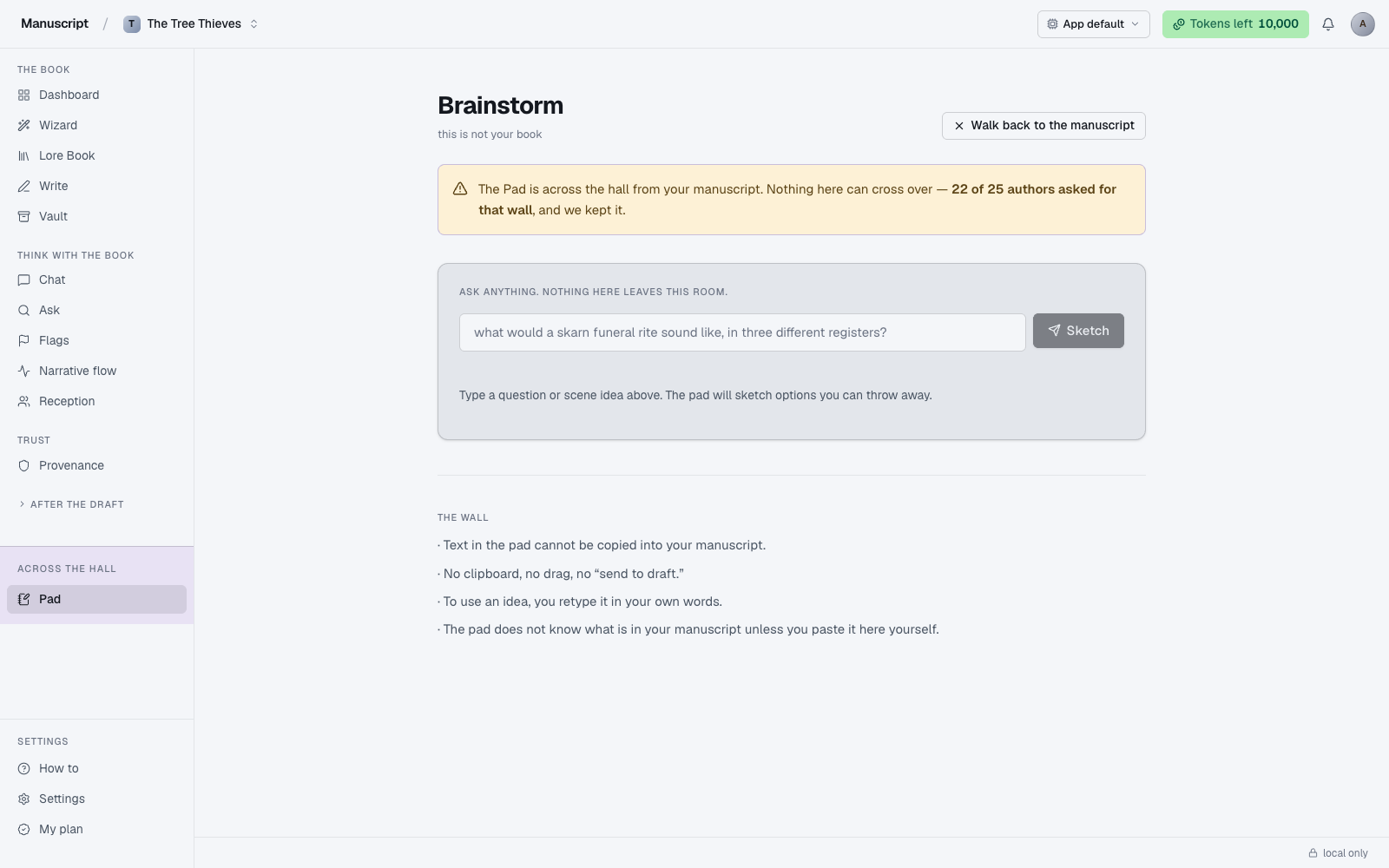
The page header reads "Brainstorm" with an eyebrow that says "this is not your book." The top-right holds a Walk back to the manuscript link that returns you to Write. Between them sits a warning banner in warm amber ("The Pad is across the hall from your manuscript. Nothing here can cross over — 22 of 25 authors asked for that wall, and we kept it.") — a single strong line, not a wall of caveats.
The wall
The Pad has three enforcements that keep it separate from your manuscript. Any single one of them would be a soft nudge; together they make lifting Pad output into your book a deliberate, effortful act — never an accident.
- A structural system prompt. The AI in the Pad is instructed at the prompt level (
PAD_SYSTEMinsrc/lib/llm.ts) to spar with you, not to produce prose you could paste into your book. If you ask it to write a paragraph "for your novel," it refuses and offers to help you think about the paragraph instead. This is the first line of defense: even if you tried to trick it, the model resists producing drop-in prose. - Copy-out is disabled. The response area carries the
.no-copyclass, which suppresses clipboard events and blocks text selection at the DOM level. You can read what's there; you can't drag-select it, right-click it, or paste-shortcut it out. Screenshotting still works, and retyping what you saw is always physically possible — but retyping is a decision you make with your hands, not a passive drift. - No cross-surface writes. There is no "send to editor" button, no "save to draft" affordance, no path from Pad to Write or Templates. The Pad's UI has nowhere to go except Burn all (clear the current sketch) or Keep for later (bookmark the session). Everything else is one-way — back to the manuscript.
Why: in research, 22 of 25 authors we talked to asked for exactly this. They wanted a place to think out loud with AI without the temptation — or the danger — of AI language creeping into their prose. The wall is the answer. If you're new to the app and you find the copy restriction annoying, that's a signal you're in the wrong surface for what you're trying to do — Chat or Write is probably the right room.
Why it's amber
The Pad is a different color from the rest of the app for the same reason kitchens and bedrooms are different rooms in a house: the environment signals the mode. Cool stone paper on the manuscript side (--bg, the default across every other surface). Warm amber paper on the Pad side (--bg-wall). The palette shift is the visual cue.
That signaling matters more than it sounds. Writers we spoke to reported that changing physical environments — moving from desk to café to porch — was often how they broke through a stuck chapter. The color change in the Pad is an attempt to replicate a fraction of that shift inside a single browser tab: a small change of scenery that says "different mode now."
How to use it
- Click Pad in the left sidebar (below the "Across the hall" band that separates it from the manuscript surfaces). The page loads on warm amber paper — visually a different room from the rest of the app — with the header Brainstorm, the eyebrow "this is not your book", and a Walk back to the manuscript link in the top-right.
- Read the warning banner at the top: "The Pad is across the hall from your manuscript. Nothing here can cross over — 22 of 25 authors asked for that wall, and we kept it." This is your reminder before you type.
- Type a question, scene idea, or thing you're stuck on into the input field labelled "Ask anything. Nothing here leaves this room." (placeholder example: "what would a skarn funeral rite sound like, in three different registers?").
- Press Enter or click Sketch. The button reads "Sketching…" with a spinner while the AI runs — usually 5–15 seconds. The status line below shows "Roughing out a few takes…".
- When the response arrives it renders below the input under the eyebrow "Disposable. Nothing here is going into your manuscript." The text has copy suppressed and selection blocked at the DOM level — you can read it, you can't lift it out.
- Choose your next step from the two footer buttons: Burn all clears the response and the prompt so you can start a new sketch; Keep for later bookmarks the session so you can revisit that train of thought.
- When you're done, click Walk back to the manuscript in the top-right to return to Write. If you want to use any idea you saw, retype it in your own words in the editor — the wall is the point.
What Chat can do that the Pad can't
Chat can be pointed at your book. You can turn on whole-book scope in Chat and it will read your manuscript, your lore, your outline — it becomes a knowledgeable co-thinker with access to your material. The Pad is deliberately blind to your book; it doesn't have your text as context, doesn't know your characters unless you type them in, doesn't remember what you wrote yesterday.
That difference is intentional. The Pad is for open freewriting when what you need is a fresh voice that has no assumptions about your book. Chat is for informed thinking when you need someone who has read what you've written. Different tools for different modes; use both.
If you find yourself wanting to "just tell the Pad about my book," you're likely reaching for Chat. Head there instead — it's built for exactly that conversation.
What the Pad can do that Chat can't
Feel like a different room. Sometimes what you need to break through a stuck chapter is not a smarter co-thinker with full context — it's a change of physical setting, a fresh voice that doesn't know your assumptions, a space where the stakes are visibly low and everything is disposable.
The Pad is that change of setting inside the app. The amber paper, the "this is not your book" eyebrow, the disabled copy, the two footer verbs (Burn all / Keep for later) — everything about the surface says "you are not drafting right now, you are thinking." That framing is the entire product.
Sessions
Every Pad conversation is a session. Sessions are saved so you can come back to a train of thought later — the "Keep for later" button in the response footer is what pins the current session to your list. The Pad's session storage is intentionally light: it holds prompts and responses, not the full history of every rejected riff, and sessions are labeled by the first line of your first message.
Sessions are per-manuscript. What you brainstorm about your fantasy novel doesn't show up when you switch to your memoir; each project has its own Pad history. That matches the rest of the app — Lore Book, Outline, Templates recent runs — where every surface's history is scoped to the current project.
If a session was a dead end, use Burn all to clear the current sketch without saving. Nothing is retained. The next time you open the Pad, you start clean.
Voice fingerprint and the Pad
Voice fingerprint is not injected into the Pad. This is by design, not an oversight. Voice injection gives the AI your voice for the purpose of producing text you'd want to use; the Pad exists specifically to produce text you cannot use. Injecting your voice would make the output more tempting to lift out, which is the exact outcome the wall is designed to prevent.
The four surfaces where voice does inject — inline commands in Write, all templates in Templates, all four kinds of Desk drafts, and every channel in Atomize — are the sanctioned drafting flows. If you want the AI's help producing prose in your voice, use those. The Pad is for thinking.
Two other surfaces also skip voice injection: Flags (should be observational, not stylized) and Chat (for thinking, not writing). The pattern: injection happens where you're producing sanctioned output; it doesn't happen where you're auditing, exploring, or reasoning.
What the Pad is not
Not a note-taking app. Notes belong in the Lore Book under the Notes kind (typed entries with structured fields) or in your Vault as an uploaded file (whole documents you want indexed for later search). Pad sessions are ephemeral by design — even "Keep for later" is a bookmark, not a permanent record.
Not a place to draft chapters. That's Write. The wall exists specifically because using an AI brainstorm surface as a drafting surface is the failure mode this app is built to prevent.
Not something to fight. The wall is there because 22 of 25 authors we spoke to wanted it. If you find yourself frustrated by the copy restriction, you're probably in the wrong surface for what you're trying to do — think about which of Write, Chat, Templates, or Desk fits your actual intent, and go there instead. The Pad is one specific tool for one specific mode.
What to read next
- Chat — the middle path between Pad and Write
- Write — the drafting surface with the accept flow
- Provenance — where the boundary between AI and you is recorded