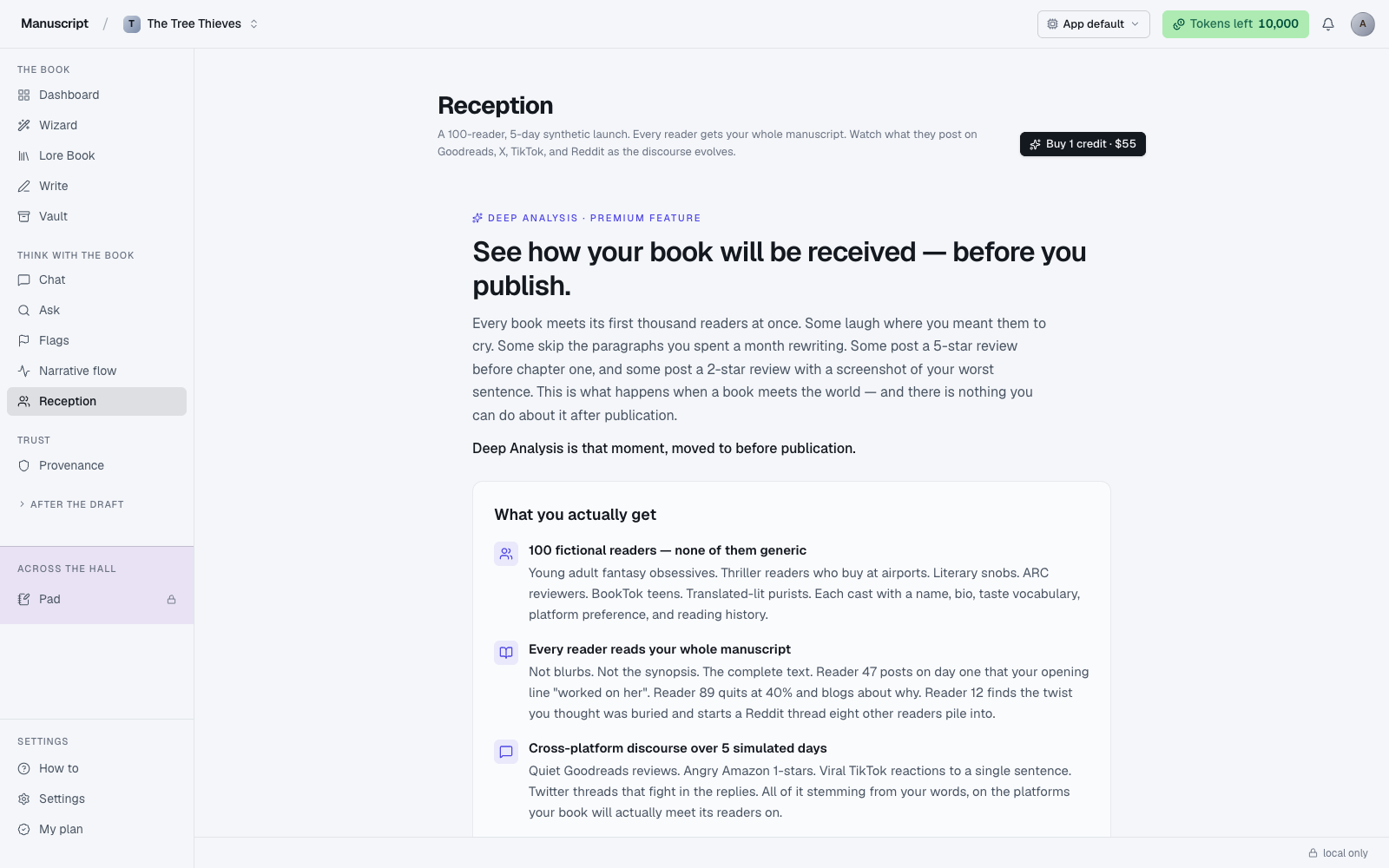
What Deep Analysis is
Deep Analysis — labeled Reception in the sidebar and in the page header — is the closest thing to a test screening for a book. You submit a completed manuscript and 100 fictional readers read it, post about it, argue about it, and review it across five simulated days on Goodreads, Amazon, Reddit, X, and TikTok. At the end, you get a synthesized read: what worked, what didn't, which threads landed, which readers loved it, which walked away by chapter 4 and why.
Each reader is its own persona — an AI-generated profile with a handle, a display name, a bio, an age band, a location, an occupation, genres they love and hate, a voice style, an influence weight, a platform lean, and a reading speed. The reading speed matters: it determines how fast each persona reaches each chapter of your book, so a fast reader might be posting about your climax on Day 2 while a slow reader is still commenting on your opening chapter. Star ratings only land once a persona is past the 50% mark, which mirrors how real readers behave.
The five days build on each other. Day 2 posts can quote, dunk on, or defend viral posts from Day 1. By Day 5 you have a full discourse arc — the initial reactions, the counter-reactions, the trending complaints, the debates, and the settling star average. The simulation is deliberately theatrical because that's what actual book reception looks like.
This is the deepest cut Manuscripts.ai offers. It's also the most expensive thing the app does — one simulation costs $55 and burns roughly 100,000 tokens of LLM work. That's the second most token-heavy operation in the entire app. Read this whole page before you run one.
What you get out of it
Once a simulation completes, the page renders it as a full multi-panel readout. The pieces you get, in the order they appear:
- A synopsis card at the top with your book's title, the synopsis the AI distilled from your manuscript, and a voice note describing the prose style — this is what was handed to the readers as their briefing.
- A stats row — total posts across all five days, total reviews specifically, the average star rating, the star histogram (1-star through 5-star bars), and the persona count.
- Day tabs across the top of the feed, Day 1 through Day 5. Click a tab to filter the feed to that day; the current-day chip is highlighted.
- Discourse events for the selected day — the trending posts, controversies, viral quotes, and platform-level phenomena that shaped that day.
- A platform filter row with chips for All, Goodreads, X, Instagram, TikTok, and Reddit. Click one to narrow the feed to just that platform.
- The post feed itself, rendered as platform-native cards. Reddit posts have upvote arrows and comment counts. X (Twitter) posts have retweet, like, and quote-tweet counts. Goodreads reviews have the yellow star row and long-form review body. TikTok reactions have a candy-pink-to-lavender gradient card. Instagram captions read like Instagram captions. Every card carries the persona's avatar (a deterministic gradient hashed from the handle), display name, handle, and post body.
The output is meant to be read like a real focus group readout, not consumed as a summary. Sit with it. Scroll through the actual posts. Read the one-star reviews carefully — that's where the actionable notes are.
Buying a credit
Each Deep Analysis simulation requires one credit. Credits are single-use, priced at $55 each. There's no bundle discount today.
If you don't have a credit yet, the page's top-right button reads Buy 1 credit · $55 instead of New deep analysis. Clicking it opens ThriveCart in a new tab, pre-filling your account email into the checkout URL so the resulting transaction can be matched back to your account automatically. Complete checkout there; the credit shows up on this page within a minute or two (the webhook can lag by up to 60 seconds).
If you have zero credits and no prior simulations, the whole page renders a paywall hero explaining what Deep Analysis is and what you get. If you have zero credits but have run simulations before, a persistent banner appears at the top of the page telling you to buy a fresh credit, and you can still browse your prior simulation histories underneath.
Your available credit balance also shows in the top-right topbar chip across the whole app, so you can see at a glance whether you're ready to run.
Running a simulation
With at least one credit available, the top-right button reads New deep analysis · uses 1 credit. Click it (or use the empty-state's Cast 100 readers button if you have no prior simulations).
Two prechecks run before the credit is consumed:
- Word count precheck. Your manuscript must be at least a full manuscript's length. If it's too short, the run doesn't start and no credit is spent — you get an inline error explaining what happened.
- Synopsis check. The AI reads your manuscript and distills a synopsis to prime the readers. If the manuscript is missing or too thin to distill from, the check fails and no credit is spent.
If both prechecks pass, the credit is consumed and the casting hall overlay opens. This is where the simulation genuinely begins to feel like theater.
The casting hall is a full-width panel with a 100-slot persona grid on the right and a phase stepper on the left. The stepper ticks through four phases: Read manuscript → Distill synopsis → Cast readers → Ready, each with a small pulsing indicator for the current phase and a checkmark for the completed ones. As the AI generates each persona, its portrait tile fills into the next open slot in the grid — 100 slots total, filling in over a couple of minutes. The panel also shows how many words were extracted from your manuscript, the distilled synopsis and tone, and a batch tracker with brief descriptions of the batches being generated.
Once casting completes and the stepper reaches "Ready", the top-right button flips to Begin Day 1 and a friendly card appears in the main feed area: "100 readers are ready. Each reader has been handed your full manuscript. Click Begin Day 1 to watch them start reading and posting."
Click Begin Day 1. A live turn strip appears showing the batch progress and the first posts landing in real time — Goodreads reviews, X threads, Reddit posts, TikTok reactions, Instagram captions, all streaming in as the personas finish their reading and post. After Day 1 completes, the button changes to Run Day 2, and so on through Day 5. Each day runs on demand — you're always in control of whether the next day happens.
The full simulation runs across five days; each day takes several minutes. You can leave the tab between days and come back — the state is persisted server-side.
When the credit is consumed and when it isn't
This is the important detail. The distinction matters because $55 is real money and the app tries hard to only charge you when the LLM work has actually begun.
- Word count precheck fails — credit is not consumed.
- Synopsis check fails — credit is not consumed. If a synopsis distillation has already run against the LLM and failed technically, the credit is auto-refunded.
- LLM cascade starts (personas begin generating) — credit is consumed. From this point on, refunds are support-only and case-by-case.
- You cancel mid-run — credit is consumed. The simulation was already spending compute.
- Another window spent your credit while you were setting up this one — credit is not consumed on this attempt; you see a specific error ("that credit was just spent by another window") and the balance refreshes.
If you're unsure whether you're ready, look at the meta line and the precheck behavior — the app tries to fail fast (and free) before spending anything. See Deep Analysis credits for the full billing detail and the classified error codes (MC-4402, MC-4409) that map to specific failure modes.
When to run Deep Analysis
Once. Or maybe twice on a manuscript's life.
Run it when:
- Your draft is complete and you've done a full revision pass
- You've run Flags and Narrative Flow and addressed what came up
- You're close to querying agents or self-publishing and want a read before you send
Don't run it when:
- You're still drafting chapters
- You just finished a first draft and haven't revised yet
- You want general feedback on a chapter — use Chat with whole-book scope instead
Deep Analysis is expensive because the simulation is deep. Don't spend $55 on a draft you know needs another pass. The simulation is worth the money when it can tell you something you couldn't get any cheaper way — how the shape of the book lands on 100 different sensibilities across a five-day launch cycle. It's not worth the money as a first read of your draft.
Prior simulations are persisted. Above the synopsis card, a SimSelector row shows tiles for every prior simulation on this manuscript, each with its created-at date. Click one to reload it — simulations are browsable at any time and you can jump between them without spending anything. Hover a tile to reveal a small trash icon on the right; click it and confirm to permanently delete that simulation and all its personas/posts/events. This history matters if you're comparing revisions — run Deep Analysis on your draft-3 manuscript, revise into draft-4, run it again with a fresh credit, and switch between the two to see how reception shifted.
What Deep Analysis is not
- Not real readers. The 100 personas are AI-simulated. Their responses are the AI's best guess at how the demographics the personas represent would respond — useful, imaginative, and directional, but not empirical.
- Not a marketing predictor. It doesn't tell you a book will sell. It tells you how a set of simulated readers reacted.
- Not editorial. It won't rewrite passages for you. For craft-level rewrites, see Templates.
- Not real-time. Days run on demand, one at a time — you decide the pace.
When something goes wrong
- I completed checkout but no credit is showing. The webhook can lag by up to 60 seconds. Wait, refresh the page. If still missing after 5 minutes, email support with your receipt email. See Troubleshooting.
- The word-count precheck failed on a book I know is long enough. Check whether the current manuscript is the one you meant. Reception operates on the manuscript that's currently active — verify via the top-right title chip in the app shell.
- The synopsis check failed. Your manuscript may be too thin for the AI to distill a synopsis from. Add more prose in Write and try again — the credit stays unused until the LLM cascade actually starts.
- "That credit was just spent by another window." You have Deep Analysis open in two tabs and one of them consumed the credit. Refresh the other tab; if the balance shows correctly, you can buy another credit or run again after purchasing.
- The run failed technically after starting. Email support with your account handle and the run timestamp. We check the logs and refund the credit if the failure was on our end. See Deep Analysis credits.
How to use it
- Click Reception in the left sidebar under "Think with the book". The page loads with the title Reception and a meta line explaining the 100-reader, 5-day format.
- If you have zero credits and no prior simulations, the full paywall hero renders instead — a marketing page explaining what you get, ending in a Buy 1 credit · $55 button that opens ThriveCart in a new tab. Complete checkout; the credit shows up on this page within a minute.
- With at least one credit available, click New deep analysis · uses 1 credit in the top-right (or on the empty-state's Cast 100 readers · uses 1 credit button). The word-count precheck and synopsis check run first — if either fails, you'll see an error and no credit is spent.
- The Casting hall overlay appears: a 100-slot grid on the right fills in with reader portraits as they're cast, and a PhaseStepper on the left ticks through Read manuscript → Distill synopsis → Cast readers → Ready. Watch for a couple of minutes.
- Once casting completes, click Begin Day 1 in the invite card (or in the top-right). A Day N in progress live strip appears showing the batch progress bar and the first posts landing in real time — Goodreads reviews, X threads, Reddit posts, TikTok reactions, Instagram captions.
- After a day completes, use the Day 1–5 tabs (below the synopsis card) to navigate simulated days. A row of discourse events appears under the tabs (viral posts, controversies, trends), then the PlatformFilter chips (All / Goodreads / X / Instagram / TikTok / Reddit) let you narrow the feed. Each post renders as a platform-native card — upvote arrows on Reddit, retweets/likes on X, star ratings on Goodreads.
- After Day 1, click Run Day 2 in the top-right, and so on through Day 5. Each day builds on the previous one — later readers can quote or dunk on viral posts from earlier days. The full simulation runs across five days; you can leave the tab and come back.
- Prior simulations appear in the SimSelector row above the synopsis — click one to reload it (they're persisted, browsable, and deletable via the trash icon on hover).
What to read next
- Deep Analysis credits — the billing detail
- Flags and Narrative Flow — the cheaper diagnostic passes to run first
- Provenance — the record of AI text you've accepted; a companion to the Deep Analysis result when you're preparing an agent submission